
Configure Cisco ASA security level with practical example
In the
previous article we learned about about what is security level of cisco ASA
firewall ,different types of security levels, different types of security zones
and in this article we learn how to configure cisco ASA firewall security level
and check the traffic from the interface.
Explain Cisco ASA security level with practical example
Explain Cisco ASA security level with practical example
Types of Cisco ASA security levels
There are
three types of security levels.
Security
level 100 is the highest security level on the Cisco ASA firewall and by
default it it assigned the inside interface of the cisco ASA firewall. As it
has highest security level traffic from internal network can roam any where. As
security level is higher for the inside zone than the other zone thus traffic
from the inside zone move to the DMZ zone as well outside zone.
Security
level 0 is the lowest security level on the
cisco ASA firewall and by default it is assigned to the outside
interface of the cisco ASA firewall. As it is lowest security level traffic
from the outside interface can not reach
the internal network unless we apply policy within the access-list. For the
outside zone security level is lower than inside zone as well as DMZ zone
therefore traffic from the outside zone can not move to inside zone as well as
DMZ zone.
Security
level<1-99> is the another security level you can create any security
level. Lets take an example suppose we create a DMZ zone and give one security
level which is 50.traffic from the DMZ zone move to outside interface as dmz security
level is higher than outside security level and traffic from the inside
interface move to DMZ zone because inside security level is higher than DMZ
level but traffic from the DMZ zone can not reach to inside interface because
inside interface has security level which is higher the security level of DMZ
zone.
When we are
going to configure security level of cisco ASA firewall security level 100 is
automatically set for the inside zone and security level 0 is assigned for the
DMZ zone and outside zone. We manually configured DMZ security level 50 to configure cisco ASA
firewall.
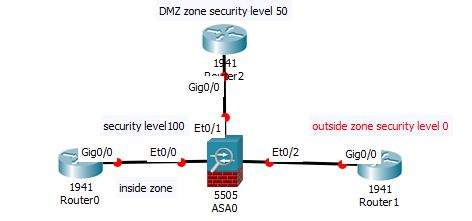
Lab Diagram
 |
| Configure Cisco ASA security level with practical example |
From the above diagram we configure cisco ASA firewall
security level. Suppose in the inside zone we have network 192.168.3.0/24 , in
the dmz zone we have network 192.168.4.0/24 and in the outside zone we have network 192.168.5.0/24.
How to Configure Cisco ASA security level
To configure
cisco ASA security level we need to configure the interface using below
commands.
For inside zone
Ciscoasa (config)#interface
E0/0
Ciscoasa(config-if)#nameif
INSIDE
Ciscoasa(config-if)#ip
address 192.169.3.2 255.255.255.0
Ciscoasa(config-if)#no
shutdown
For
DMZ zone
Ciscoasa (config)#interface
E0/1
Ciscoasa(config-if)#nameif
DMZ
Ciscoasa(config-if)#ip
address 192.169.4.2 255.255.255.0
Ciscoasa(config-if)#no
shutdown
For
outside zone
Ciscoasa (config)#interface
E0/2
Ciscoasa(config-if)#nameif
OUTSIDE
Ciscoasa(config-if)#ip
address 192.169.5.2 255.255.255.0
Ciscoasa(config-if)#no
shutdown
Thanks for read this article.If this article is helpful please share this article.
Thanks for read this article.If this article is helpful please share this article.
