Showing posts with label SWITCHING. Show all posts

Configure port security on cisco switch using packet tracer via switch port step by step guide


Port Security On Cisco Switch |In this article we learn about configure port security on cisco switch. It is very important to enhance network security .any persons can intestinally do any harmful activity as normally by default all ports are  open on the cisco switch. To prevent it network admin bind the mac address  to the switch port and set the violation mode.

Lab Diagram
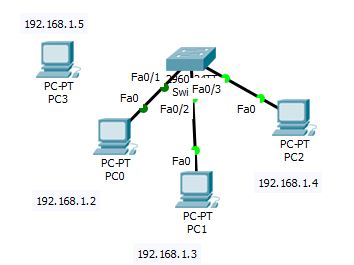

Configure port security on cisco switch using packet tracer via switch port


In the above diagram pc0,pc1 and pc2  are sequencially connected to fa0/1,fa0/2 and fa0/3 of the switch. When we are going to connect pc3 to fa0/1 port of the switch as per the configuration the port fa0/1 will be shutdown.

Configuation port security on cisco switch

Now this is time to configure port security on cisco switch.
Switch#conf t
Enter configuration commands, one per line. End with CNTL/Z.
Switch(config)#int fa0/1
Switch(config-if)#switchport port-security maximum 1
Switch(config-if)#switchport port-security violation shutdown
Switch(config-if)#switchport port-security mac-address sticky
Switch(config-if)#exit

Verify the Configuation of port security on cisco switch

To verify the configuration of port security on cisco switch execute the following command . After executing the command we get the mac address.

Switch#show mac-address-table
Mac Address Table
-------------------------------------------

Vlan Mac Address Type Ports
---- ----------- -------- -----


From the above output we don’t get any output. After do pinging from pc0 to pc1 we get the output the of the mac-address-table.


Packet Tracer PC Command Line 1.0
C:\>ping 192.168.1.3

Pinging 192.168.1.3 with 32 bytes of data:

Reply from 192.168.1.3: bytes=32 time=15ms TTL=128
Reply from 192.168.1.3: bytes=32 time=1ms TTL=128
Reply from 192.168.1.3: bytes=32 time<1ms TTL=128

Ping statistics for 192.168.1.3:
Packets: Sent = 4, Received = 4, Lost = 0 (0% loss),
Approximate round trip times in milli-seconds:
Minimum = 0ms, Maximum = 15ms, Average = 4ms

After executing the pinging from pc0 to pc1 we the mac address table output

Switch#show mac-address-table
Mac Address Table
-------------------------------------------

Vlan Mac Address Type Ports
---- ----------- -------- -----

Switch#show mac-address-table
Mac Address Table
-------------------------------------------

Vlan Mac Address Type Ports
---- ----------- -------- -----

1 0002.16c5.9b76 DYNAMIC Fa0/1
1 0060.5c47.175d DYNAMIC Fa0/2


When we are going to connect pc3 to fa0/1 port of the switch due to exceed the maximum limit the port will be violated and shutdown. Thats why  when we are trying to ping from pc3 to pc1 we get the “request time out” output.

If this article is useful to know about Port Security On Cisco Switch please share and subscribe it


Introduction and simple guide of Ether-channel with practical example using packet tracer


What Is Ether-channel | Redundancy links play a very important role in network architecture. But  when we are going to establish redundant links between switch for redundancy stp prevents the looping link between the switch therefore we can not establish redundant links between switches .we can utilize all links using ether channel.

Concept of Ether-channel

STP prevents the layer2 looping between switches.
Suppose we have two switches (switch0 and switch1).switch0 is connected to switch1 by 3 fast Ethernet links for redundancy purpose. If stp is active between two switches  two links are blocked for prevent the layer2 loop.we only get one link between two switches.
That means we get 100mbps link instead of 300mbps link. To utilize 300 mbps link we have to create port channel through which we can get efficient bandwidth.

Advantage of Ether-channel

After establish the ether channel there are many advantages:
·         Load balancing is possible between the switches  as there is three redundant links.
·         If one physical  link is failure communication is still establish for the other redundant  links.

Type of Protocol

Two protocols are there.
·         PAGP: Developed by cisco and using two mode one is auto and other is desirable.
·         LACP: Open standard Protocol  and there is also two mode one is active and other is passive.

Configuration of Ether-channel

Suppose we have two switches (switch0 and switch1).switch0 is connected to switch1 by 3 fast Ethernet links for redundancy purpose. If stp is active between two switches  two links are blocked for prevent the layer2 loop which is identified by red ink.

Ehter-channel,networking
Ehter-channel


On switch1 we run one command to check the blocking port :


Switch#show spanning-tree active

Interface Role Sts Cost Prio.Nbr Type
---------------- ---- --- --------- -------- --------------------------------
Fa0/1 Root FWD 19 128.1 P2p
Fa0/2 Altn BLK 19 128.2 P2p
Fa0/3 Altn BLK 19 128.3 P2p

Here we found that state of  Fa0/2 and Fa0/3  port is block.

Now we are going to create ether channel using LACP .
We go to  interface configuration mode using the below command:

Switch(config)#interface range fastEthernet 0/1 - fastEthernet 0/3
Switch(config-if-range)#channel-protocol lacp
Switch(config-if-range)#channel-group 1 mode active


After execute these above commands port channel 1 is created and three redundant link will be active.We can verify all active ports using the following command:


Switch#show spanning-tree active

Interface Role Sts Cost Prio.Nbr Type
---------------- ---- --- --------- -------- --------------------------------
Po1 Root FWD 8 128.27 Shr


If this article is useful to know Concept of Ether-channel  please share and subscribe it

Inter-vlan Routing step by step guide through packet tracer


Inter Vlan Routing |In  this previous article we learnt how vlan works.In this article we learn about the concept of inter-vlan routing that is in some organization there is requirement to communicate different department to each other,there this methodology is required to solve the problem which we will discuss later.

Suppose in some organization there is two departments and the basic task of the network admin is to assign user for the particular vlan to communicate with the user within the particular vlan. Two vlans have their own network subnet. User of the different vlan can not be communicate to each other as they are using different broadcast domain.

But in some organization there is requirement to communicate different department to each other,there this methodology is required to solve the problem.

Concept of Inter-vlan Routing

In some organization there is two departments ,so we create two vlans.Each vlans has its own subnet. Normally switch works at layer2 of OSI layer so,it is not containing any logical address therefore two different vlans can not be communicate with each other.
To communicate two different vlans we have to connect a router to the switch. Sender vlan user data is passed to router through switch then switch forward the  packet to the designated vlan using destination  ip address.Then the interface of the router act as gateway of vlan.

Type of Inter-vlan Routing

There are two type of Inter-vlan Routing
·          Traditional Inter-vlan Routing
·         Router-in –a-stick

Traditional Inter-vlan Routing

In this type of routing router is connected to the switch using multiple interfaces. These interfaces  act link default gateway of the vlan.
Sender vlan user data is passed to router interface for the particular vlan through switch.When router receive the packet and examine the destination address where the data will be go and forward the packet to the designated  vlan user.

Inter-vlan Routing,networking

Inter-vlan Routing


Router-in –a-stick

Suppose we have 4 vlans on a switch,it is possible from switch end as there are many ports on switch  but in case of router limited ports is available ,that's why  router is connected to  switch through  single interface and it is splitted  for different interfaces is called subinterface. these subinterfaces act as the gateway of the particular vlan.
Lets take an example if router is connected to the switch  using fa0/0 interface.we have many vlans configured on the switch like vlan10,vlan20 and so on.so we create sub interfaces on the router like for vlan10 subinterface will be fa0/0.10 and this is the default gateway of vlan10.


Configuration of vlan using packet tracer software step by step guide


Configuration of Vlan Commands| In this article we learn about configuration of vlan, how assign port to particular vlan.

Concept of native vlan

Native vlan is useful to send untagged frame .Tagged frame  sends  the traffic for the particular vlan but untagged frame can any traffic which is not gone through to any particular vlan.

Concept of Dynamic trunk protocol

Dynamic Trunk Protocol is a cisco proprietary protocol which automatically negotiates the switch mode. Three types of mode is available in  cisco switch port.

·         Access portAccess port is the port where end gadget is associated. 

·         Trunk port: Trunk port is the port which conveys labeled and untagged traffic both between the switch.

·         Dynamic

Configuration of vlan


Lets take a example

Suppose in an organization there is two departments one is hr and other is sales.
So we configure two vlans for two departments by which any department can not communicate the other department.

To configure the vlan we need  to enter the global configuration mode and execute  the following command.

Switch(config)#vlan <vlan no>

After running the above  command we got the following promt in which we can define the name of the vlan  as per our example.

We configure vlan10 for hr department and vlan20 for sales department.


Configuration of vlan,vlan configuration on cisco switch, vlan configuration on cisco router, vlan configuration on hp switch,vlan configuration commands,trunk port configuration
Configuration of vlan


Switch(config)#vlan 10
Switch(config-vlan)#name hr
Switch(config-vlan)#exit
Switch(config)#vlan 20
Switch(config-vlan)#name sales
Switch(config-vlan)#exit

Assign port to vlan

After configuration of vlan we need to assign port on the switch to the configured vlan.
Here pc0 is connected to fa0/1.As access port is configure for the end gadget.
To assign the port to the vlan we go to interface configuration and execute the following  command.
Switch(config)#int fa0/1
Switch(config-if)#switchport mode access
Switch(config-if)#switchport access vlan 10
Switch(config-if)#exit
Switch(config)#int fa0/2
Switch(config-if)#switchport mode access
Switch(config-if)#switchport access vlan 20
Switch(config-if)#exit

Configure Trunk port

Trunk port is the port which conveys labeled and untagged traffic both between the switch.To configure trunk port we need to move  interface config mode and execute the below command.

Here fa0/3 is the trunk port because it creates the trunk link between two switches.


Switch(config)#int fa0/3
Switch(config-if)#switchport mode trunk
Switch(config-if)#exit

 If this article is helpful to about Configuration of Vlan please share this article.


Concept of vlan with advantage


Concept and Advantage of Vlan |In this article we learn about the vlan and the advantage of vlan.

Defination of vlan

Vlan is splitted physical switch to multiple logical switches. Normally switches has one broadcast domain but when we talk about vlan, it can divide one broadcast domain to multiple broadcast damains.As switch  has one broadcast domain so by default on switch has one ip subnet but  there are multiple ip subnets for vlan  because one broadcast domain is splitted  into multiple broadcast domains.


We are going through one example:
Suppose  in abc organization there is two departments one is hr and another is sales.  For security purpose and separate the traffic between two different departments we  need to segregate two different lan segments. Switch has one ip subnet so this is not a proper solution and we can not separate the traffic .If we have place one router then we required two different  network  segments.
In this scenario we have to establish vlan to solve the issue because vlan can splitted  one broadcast domain to multiple broadcast domains therefore we got multiple ip subnets on one switch to segregate  the traffic for the two different departments.

                   How to configure vlan

Advantage of vlan

Now we are going to describe the advantage of vlan.

1)security:                                                                                                    Users from different departments enters the one hardware  switch with  different access priviledge when we use vlan and traffic is flowing as per there respective vlan.


2)cost Reduction:   
                                                                                                               
 To separate traffic each departments need one switch .If we use vlan we divided one broadcast domain to multiple broadcast domains therefore we get multiple ip subnets to separate the traffic which reduce the cost for purchasing additional hardware.


3)Improvemt Performance: 
                                                                                                                 By default switch has one broadcast domain.When a frame is going to a system  and system mac address  not registered in mac table of the switch then switch broadcast on all the ports as a result degrades the performance.For vlan broadcast traffic is limited for particular vlan.


Concept Of Vlan,Networking
Concept Of Vlan


The concept of tunks

When vlan is configured among many switches the interconnection between the switches is called trunk. Different tagged frames are traveled between two switchs using tunks.

Two type of trunks links are there in cisco  switch one is ISL link and other is IEEE 802.1Q trunks link.

Concept of native vlan

Native vlan is useful to send untagged frame .Tagged frame sends  the traffic for the particular vlan but untagged frame can  any traffic not sends traffic for a  particular vlan.

If this articale is helpful to know about Concept and Advantage of vlan please share this article.


Please Donate To Bitcoin Address: [[address]]
Donation of [[value]] BTC Received. Thank You.
[[error]]