Showing posts with label centos. Show all posts

How to install latest phpMyAdmin on CentOS 7


Install phpMyAdmin CentOS 7 | In  this tutorial we will learn how to install latest phpMyAdmin on CentOS 7. We can install phpMyAdmin in two ways . One is from the source file and other is from EPEL repository.

What is phpMyAdmin

phpMyAdmin is open source and free web application which is used to mange MySQL database and MariaDB database and it was written in php language and it is very famous tool  for database administrator to mange MySQL database using the GUI interface.


Install phpMyAdmin using source file


Step 1) To install phpMyAdmin using source file first we need to download the source file using the wget command as per below instruction.
we will download the source file in /usr/share directory.


[root@techrideradmin share]# wget https://files.phpmyadmin.net/phpMyAdmin/4.9.1/phpMyAdmin-4.9.1-all-languages.zip
--2019-09-22 12:34:36--  https://files.phpmyadmin.net/phpMyAdmin/4.9.1/phpMyAdmin-4.9.1-all-languages.zip
Resolving files.phpmyadmin.net... 89.187.162.19
Connecting to files.phpmyadmin.net|89.187.162.19|:443... connected.
HTTP request sent, awaiting response... 200 OK
Length: 11349731 (11M) [application/zip]
Saving to: “phpMyAdmin-4.9.1-all-languages.zip”

100%[======================================>] 11,349,731   229K/s   in 40s

2019-09-22 12:35:17 (277 KB/s) - “phpMyAdmin-4.9.1-all-languages.zip” saved [11349731/11349731]

Step2) After download the source file we need to unzip the zipped source file using the below command.
[root@techrideradmin share]# unzip phpMyAdmin-4.9.1-all-languages.zip


Step3) Now we need to rename the file using the below command.
[root@techrideradmin share]# mv phpMyAdmin-4.9.1-all-languages phpMyAdmin


Step4) Now we need to change the ownership and permission of the file using the below command. 
[root@techrideradmin share]# chown –R  apache:apache phpMyAdmin
[root@techrideradmin share]# chmod  -R 755 phpMyAdmin


Step5) Now we need to create phpMyAdmin configuration file named “phpMyAdmin.conf”  into the /etc/httpd/conf.d  directory and paste the below code into the configuration file to access phpMyAdmin web page from emote machine to manage MySQL server.

Alias /phpMyAdmin /usr/share/phpMyAdmin
Alias /phpmyadmin /usr/share/phpMyAdmin

<Directory “/usr/share /phpMyAdmin”>
Order Deny,Allow
Deny from all
Allow from 192.168.137.1(your workstation ip address)
</Directory>


Step6) Now we need to restart the httpd service using the below command. 
[root@techrideradmin share]#systemctl restart httpd

Step7) Now we can access the phpMyAdmin  web page using the below url from your workstation. In my case my Mysql server ip 192.168.137.5.

192.168.137.5/phpMyAdmin

 Install phpMyAdmin with apache on CentOS 7


In this section we will learn how to install phpMyAdmin  on CentOS 7 without using source file.

Before installing phpMyAdmin we need to check the prerequisite of the CentOS 7 server . As phpMyAdmin is basically written by php language so we need to install LAMP stack on the server. To install LAMP (Linux, Apache, MySQL,Php) stack you can follow the following link.


Step 1) First we need to install phpMyAdmin package on the CentOS 7 server . But this package is not available on the CentOS 7 default repo. So we need to install EPEL repo on his server.


Step 2) After installing EPEL repo we need to install phpMyAdmin package from the EPEL repo using the below command. 
[root@techrideradmin ~]#yum install phpmyadmin


Step 3) After installing this package we have to go the configuration file which is located at  “/etc/httpd/conf.d/phpMyAdmin.conf” to configure phpMyAdmin to access from the remote machine.
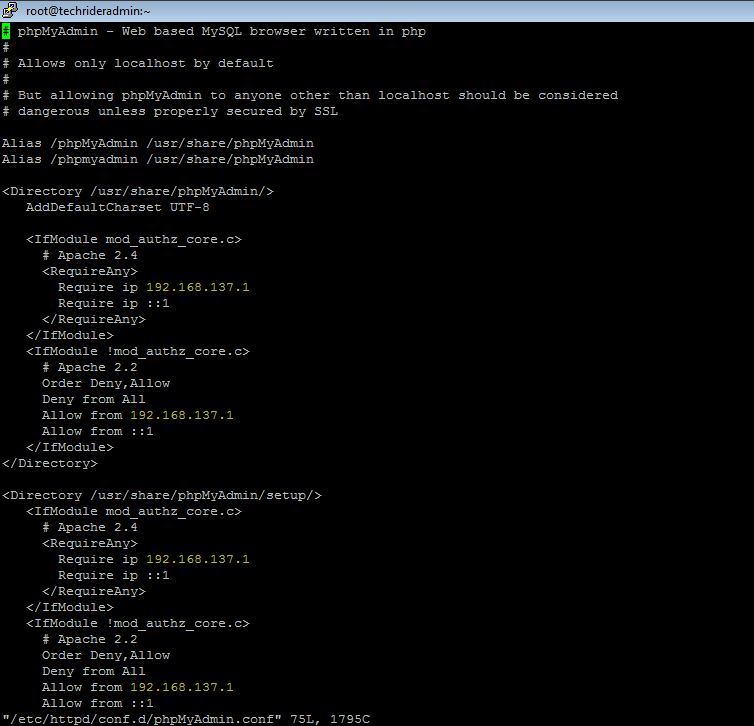
Configuration file of phpMyAdmin,Install phpMyAdmin CentOS 7
Configuration file of phpMyAdmin


 From the above picture we need to change this four lines with my remote machine ip address .

Step 4) Finally we need to restart the apache server to take affect using the below command.
[root@techrideradmin ]#systemctl restart httpd

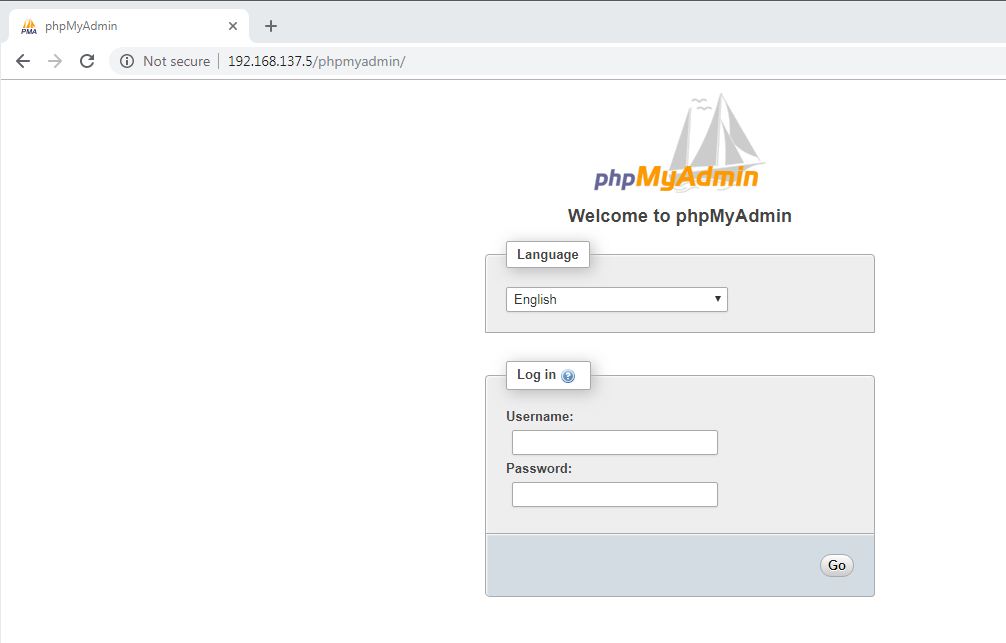
Now we can access my phpMyAdmin web page from my remote machine using the below url.

192.168.137.5/phpMyAdmin
Install phpMyAdmin CentOS 7

After getting access to login phpMyAdmin web page we can use MySQL server username and password in the username and password field.

Now we have successfully installed phpMyAdmin to manage MySQL database.
How to create a shell script using the conditional statement on CentOS and RHEL 6/7 step by step guide


How to create a shell script using the conditional statement on CentOS and RHEL 6/7  step by step guide


In this article we will learn how to create a shell script using the conditional statement  and execute it on CentOS and RHEL linux system and we are going to create a script with bash if  statement to demonstrate example.


Shell script is very powerful language for a system admin to execute the daily basic staff.


In this article we use if else statement to understand the example.
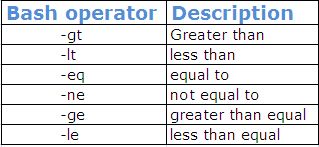
Following bash operators are useful to write a conditional shell script program.
bash operator in shell script for linux unix system| techrideradmin,bash if
bash operator in shell script for linux unix system| techrideradmin

How to create a shell script using if else statement on linux system

======================================================================
Now we are going to write one small shell script program to understand how conditional statement works in the shell script program on the linux system  .


First we create one empty file named condition .sh using the below command.

#touch condition.sh

After creating empty file we enter the below line to create bash if statement in the file. 

#!/bin/bash
echo How old are you?
read  age
if [ “$age” –gt 25 ] then
echo you can drive
else
echo you can not drive
fi

note: we shoule use #!/bin/bash to identify this script only run in bash shell not the other shell .

 How to execute the shell script program

======================================================================
To execute this program we need to execute the below command.

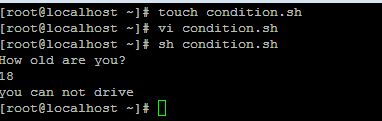
[root@localhost ~]# sh condition.sh

After execute the above command we can find the below output..


Output:
How old are you?
18
you can not drive
How to create a shell script using the conditional statement on CentOS and RHEL 6/7  step by step guide
How to create a shell script using the conditional statement on CentOS and RHEL 6/7  step by step guide

That’s all. If this article is helpful to know about bash if statement please share it!!!!


Please Donate To Bitcoin Address: [[address]]
Donation of [[value]] BTC Received. Thank You.
[[error]]

How to create and show table in mysql database using python on CentOS and RHEL 6/7 step by step guide


How to create and show table in  mysql database using python on CentOS and RHEL 6/7  step by step guide


In this article we will learn how to create mysql table in  database using python language.

We need to install the mysql.connector module using the below command.

#pip3 install mysql.connector

Normally we create mysql table into database using “create table” statement and select the database in which mysql table will be created.

How to create mysql table into databse using python

First we need to create one file named createtable.py and enter the below code into this file  .

import mysql.connector

mydb = mysql.connector.connect(
  host="localhost",
  user="root",
  passwd="abc123",
  database=” pythonclass”
)
cur = mydb.cursor()
cur.execute("CREATE TABLE student (name VARCHAR(30), location VARCHAR(100))")

How to execute the python progam

To execute the python program we need to execute the below command.
[root@localhost ~]# python3 createtable.py

After executing the above command new table has been created.

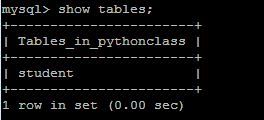
Now enter the mysql promt and verify it is created or not using “show tables” statement.


mysql> show tables;
+-----------------------+
| Tables_in_pythonclass |
+-----------------------+
| student               |
+-----------------------+
1 row in set (0.00 sec)
How to create and show table in  mysql database using python on CentOS and RHEL 6/7  step by step guide
How to create and show table in  mysql database using python on CentOS and RHEL 6/7  step by step guide

How to view mysql database table using python

We also can check created table list using python program.

We create one file name showtable.py and enter the below command.

import mysql.connector

mydb = mysql.connector.connect(
  host="localhost",
  user="root",
  passwd="abc123"
  database=”pythonclass”
)

cur = mydb.cursor()

cur.execute("SHOW TABLES")

for x in cur:
  print(x)


That’s all. If this article is helpful please share it!!!!


How to install pip3 on CentOS and RHEL 6/7 step by step guide


How to install pip3  on CentOS and RHEL 6/7  step by step guide

In this article we will learn how to install pip3 on CentOS and RHEL linux system which is very useful to install python packages for that reason it is called as python package manager.
How to install pip3  on CentOS and RHEL 6/7  step by step guide
How to install pip3  on CentOS and RHEL 6/7  step by step guide

How to install Pip on CentOS and RHEL  linux system

 Pip package is not available the redhat or centos repo. We need to install epel to install the pip package.To install pip on the linux system we need to execute the below commands.

#yum install epel-release
#yum install python-pip

After install this package we need to verify .

How to verify the version of pip

To verify the pip version which you have installed  execute the below commands.

#pip –V 
#pip3 –V

How to run pip to manage python packages

To manage python package ( install ,uninstall and search ) using pip we need to execute the below commands.

#pip install <package_name>
#pip uninstall <package_name>
#pip search <package_name>

That’s all. If this article is helpful please share it!!!!


Please Donate To Bitcoin Address: [[address]]

Donation of [[value]] BTC Received. Thank You.
[[error]]

How to upgrade pip3 on CentOS and RHEL 6/7 step by step guide


How to upgrade pip3  on CentOS and RHEL 6/7  step by step guide

In this article we will learn how to install pip3 on CentOS and RHEL system which is very useful to install python packages for that reason it is called as python package manager.

How to install Pip on CentOS and RHEL  linux system
 

Pip package is not available the redhat or centos repo. We need to install epel to install the pip package.To install pip on the linux system we need to execute the below commands.

#yum install epel-release
#yum install python-pip

After install this package we need to verify the version of pip .

How to verify the version of pip

To verify the pip version which you have installed  execute the below commands.

#pip –V 
#pip3 –V

How to upgrade the version of pip

To upgrade version of pip we need to execute the below command.

# pip3.6 install --upgrade pip

Collecting pip
  Downloading https://files.pythonhosted.org/packages/5c/e0/be401c003291b56efc55aeba6a80ab790d3d4cece2778288d65323009420/pip-19.1.1-py2.py3-none-any.whl (1.4MB)
    100% |████████████████████████████████| 1.4MB 8.0kB/s
Installing collected packages: pip
  Found existing installation: pip 9.0.1
    Uninstalling pip-9.0.1:
      Successfully uninstalled pip-9.0.1
Successfully installed pip-19.1.1
How to upgrade pip3  on CentOS and RHEL 6/7  step by step guide
How to upgrade pip3  on CentOS and RHEL 6/7  step by step guide 


How to run pip to manage python packages

To manage python package ( inatall ,uninstall and search ) using pip we need to execute the below commands.

#pip install <package_name>
#pip uninstall <package_name>
#pip search <package_name>

Example:
# pip3.6 install mysql.connector

Collecting mysql.connector
  Downloading https://files.pythonhosted.org/packages/28/04/e40098f3730e75bbe36a338926f566ea803550a34fb50535499f4fc4787a/mysql-connector-2.2.9.tar.gz (11.9MB)

That’s all. If this article is helpful please share it!!!!


Please Donate To Bitcoin Address: [[address]]

Donation of [[value]] BTC Received. Thank You.
[[error]]

How to read the dynamic value in shell script on CentOS and RHEL 6/7 step by step guide


How to read the dynamic value  in  shell script on CentOS and RHEL 6/7  step by step guide


In this article we will learn how to read the dynamic value in shell script and execute it on CentOS and RHEL linux sytem.


Shell script is very powerful language for a system admin to execute the daily basic staff.


Variable store some information and data which will be used rest of the shell program which is predefined value but when we talk about dynamic value then we use read parameter in the shell script.

How to read dynamic value shell script on linux system

======================================================================
Now we are going to write one small shell script program to understand how to enter the dynamic value  in  shell script program and read it to put the dynamic value on the linux system  .


First we create one empty file named read.sh using the below command.

#touch read.sh

After creating empty file we enter the below line in the file.

#!/bin/bash
echo what is the name of website?
read  websitename
echo welcome to $websitename

note: we shoule use #!/bin/bash to identify this script only run in bash shell not the other shell .

How to execute the shell script program

==================================================================
To execute this program we need to execute the below command.

[root@localhost ~]# sh read.sh

After execute the above command we can find the below output..
  

Output:
what is the name of website?
techrideradmin
welcome to techrideradmin
How to read the dynamic value  in  shell script on CentOS and RHEL 6/7  step by step guide
How to read the dynamic value  in  shell script on CentOS and RHEL 6/7  step by step guide


That’s all. If this article is helpful please share it!!!!


Please Donate To Bitcoin Address: [[address]]
Donation of [[value]] BTC Received. Thank You.
[[error]]

How to define variable in shell script on CentOS and RHEL 6/7 step by step guide


How to define variable in  shell script on CentOS and RHEL 6/7  step by step guide


In this article we will learn how to define variable in shell script and execute it on CentOS and RHEL linux sytem.

Shell script is very powerful language for a system admin to execute the daily basic staff.

Variable store some information and data which will be used rest of the shell program.

How to define variable shell script on linux system

===================================================================
Now we are going to write one small shell script program to understand how to define variable in  shell script on the linux system  .

First we create one empty file named variable.sh using the below command.

#touch variable.sh

After creating empty file we enter the below line in the file.

#!/bin/bash
website=”techrideradmin”
echo welcome to $website

note: we shoule use #!/bin/bash to identify this script only run in bash shell not the other shell and when define viable don’t use $ sign and when print the output the we have to put $ sing to getting the output.

How to execute the shell script program

====================================================================
To execute this program we need to execute the below command.

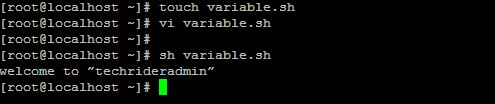
[root@localhost ~]# sh variable.sh

After execute the above command we can find the below output..

Output:
welcome to “techrideradmin”
How to define variable in  shell script on CentOS and RHEL 6/7  step by step guide
How to define variable in  shell script on CentOS and RHEL 6/7  step by step guide


That’s all. If this article is helpful please share it!!!!


Please Donate To Bitcoin Address: [[address]]
Donation of [[value]] BTC Received. Thank You.
[[error]]

How to create shell script on CentOS and RHEL 6/7 step by step guide

How to create shell script on CentOS and RHEL 6/7  step by step guide


In this article we will learn how to create shell script and execute it on CentOS and RHEL linux system.

Shell script is very powerful language for a system admin to execute the daily basic staff.

================================

How to create shell script on linux system

=====================================

Now we are going to write one small shell script program to understand how to write shell script on the linux system  .
First we create one empty file named test.sh using the below command.

#touch test.sh

After creating empty file we enter the below line in the file.

#!/bin/bash
echo Welcome to TechRiderAdmin

note: we shoule use #!/bin/bash to identify this script only run in bash shell not the other shell .

===========================

How to execute the shell script program

=======================================
To execute this program we need to give execute permission on the test.sh file execute the below command.

[root@localhost ~]#chmod u+x test.sh

After execute the above command we can run the script using the below command.

[root@localhost ~]#sh test.sh
How to create shell script on CentOS and RHEL 6/7  step by step guide
How to create shell script on CentOS and RHEL 6/7  step by step guide


That’s all. If this article is helpful please share it!!!!


Please Donate To Bitcoin Address: [[address]]
Donation of [[value]] BTC Received. Thank You.
[[error]]

How to rename file on CentOS and RHEL 6/7 step by step guide


How to rename file  on CentOS and RHEL 6/7  step by step guide

In this article we will learn how to rename file and multiple files  on linux system which is very common task for a linux administrator and also change the extension of the multiple file in linux system.  

How to rename single file on CentOS and RHEL  linux system

-------------------------------------------------------------------

To rename the file of the linux system we need to execute the below command.

#mv  <oldfile> <newfile>

Lets take an example we have one file names testold and we want to rename this file name to testnew.so we need to execute the below command.

#mv  testold testnew

[root@localhost project]# touch testold
[root@localhost project]# ls
testold
[root@localhost project]# mv testold testnew

After execute the above command we can verify it using ls command.

[root@localhost project]# ls
Testnew
How to rename file  on CentOS and RHEL 6/7  step by step guide
How to rename file  on CentOS and RHEL 6/7  step by step guide

How to rename multiple file on linux system

-------------------------------------------------------------------
To rename multiple files on linux system we need to use rename coammnd.
#rename  's/old/new/' files
Suppose  we have many files with the extension of sh we need to change the extension into txt so we need to execute the below commands.
#rename  's/sh/txt/' *.sh
*  indicates that all files with sh extension will be converted to txt extension.

That’s all. If this article is helpful please share it!!!!