Showing posts with label ORACLEDATABASE. Show all posts

Redo logs management in oracle 11g


In this tutorial we will learn  what is redo logs in oracle,view oracle redo log group and members (redo log files),  add redo log file in redo group,drop redo log file and redo log group in oracle.


    What is redo logs  in oracle

    REDO log file is very essential file for Oracle database which is stored in physical filesystem of hard disk. Normally it is a file which records all changes made in oracle database .
    Suppose a user modified any row using SQL query ,the changed data  will be stored in redo Buffer in SGA components. Then LGWR  process transferred all data from redo Buffer to redo log file under the following conditions.

    1. Redo Buffer one third full
    2. Every 3 seconds
    3. After a successful transaction committed
    4. Before data blocks transfer from db buffer cache to data files.


    View oracle redo log group and members (redo log files)

    We can see Status of redo group and size using the dba directory table  called v$log .here group 2 is current means oracle uses this group to store redo log file and group 1 and group 3 are inactive means it is no longer required to recover oracle database.

    Status of redo group

    We can view oracle redo log group members using one Dba directory called v$logfile. Here under the member we find the location of the redo log file. Here redo01.log file belongs to group 1 , redo02.log file belongs to group 2 and redo03.log file belongs to group 3.
    It is recommended that each group should be at least two redo log file if none redo log file is corrupted then database will be worked using other redo log file.and also two redo log files will be stored on the different disks.if one disk is corrupted then we will get second redo log file in other disk.
    redo logs  in oracle


     Add redo log file in redo group

    We can add redo log file member to redo log group using the command.here redo01a.log redo log file member is added to group 1 and it's status is invalid.
    Add  redo log file


    After switching the log file the status will be valid.
    Add redo log file

    Drop redo log file and redo log group in oracle

    We can drop redo log file using the below command. Here redo01a.log file will be dropped.
    Drop redo log file


    We can drop redo log group sing the below command. Here we delete group 1 .we can not drop the group which status is current.in our case our current group is group 2.
    Drop redo group

    After dropped the group 1 ,redo log files inside the group 1 was not deleted.it is stored on the physical filesystem of the disk.we need delete this log file using the os command.
    Here we did not delete this file and create group 1 using the same file we got this below error.
    Error

    After deleted the Physical redo log file from the disk we can create redo group 1 with the redo log file using the same name.no error came.
    Redo log management oracle 11g


    In this article we have learned
    1.   what is redo log file in oracle
    2. View oracle redo log group and members (redo log files)
    3. Add redo log file in redo group
    4. Drop redo log file and redo log group in oracle
    Stay tune with us.😊


    What is Redo log file in oracle


    In this tutorial  we will learn what is redo log files,why we are creating multiple redolog files for Oracle database ,different status of redo log file,purpose of redo log file

    Redo log file in oracle


      What is redo log file in oracle

      REDO log file is very essential file for Oracle database which is stored in physical filesystem of hard disk. Normally it is a file which records all changes made in oracle database .
      Suppose a user modified any row using SQL query ,the changed data  will be stored in redo Buffer in SGA components. Then LGWR  process transferred all data from redo Buffer to redo log file under the following conditions.
      1. Redo Buffer one third full
      2. Every 3 seconds
      3. After a successful transaction committed  
      4. Before data blocks transfer from db buffer cache to data files. 

      Why we are creating multiple redolog files for Oracle database

      It is recommended to create multiple redolog files in oracle database. If there is one redo log file and by accidentally it is corrupted then oracle database is not working properly. So multiples redo files should be created in the oracle database.

      Also we should create redo log files on the separated disk. If we have redo log files on single disk and this disk is corrupted for that we lost all redo log files and database will be not worked. Therefore we should create redo log files on separate disk.
      Redo log files are very essential file to recover oracle database in case oracle instance crashes  by any reason. Now in oracle database many redo log files are created a group.

      Redo group is very important while archiving redo log files.suppose group 2 is current that means oracle uses these redo log files which present in group 2 and archive process then archiving redo log files from other group.for that reason database performance is not degraded.

       Different status of redo log file

      There are three status of redo log files.

      1. Current: oracle database uses this redo files to store the online changes data.
      2. Active: These files are required to recover  oracle database. 
      3. Inactive:These files are no longer required to recover oracle database. 

      Purpose of redo log file

      In case oracle instance crashes then Redo log files are required to recover oracle database.
      In this tutorial we have learned
      1.  what is redo log files
      2. Why we are creating multiple redolog files for Oracle database 
      3. Different status of redo log file
      4. Purpose of redo log file 

      Stay tune with us to know about redo logs management with practical.


      Temporary tablespace group in oracle database


      In this tutorial we will learn what is a temporary tablespace group, how to create a temporary tablespace group,how to add existing temporary tablespace to temporary tablespace group , how to set a temporary tablespace group to default temporary tablespace.


        What is temporary tablespace group:-

        In the previous tutorial we have learned about temporary tablespace. If we have one temporary tablespace all users are working on that temporary tablespace for that there will be a chance to reduce the performance. If we have bound multiple temporary tablespaces in a group all users are assigned to that temporary tablespace group and they will get all temporary tablespaces to do the multiple sorting,joining operations for that the conflict can be reduced.

        How to create a temporary tablespace group in oracle:-

        There will be no specific command to create a temporary tablespace group. We can create a temporary tablespace group by using create temporary tablespace statement.

        SQL>create temporary tablespace TEMP02 tempfile '/u01/app/oracle/oradata/orcl/temp03.dbf' size 20m tablespace group temp_group;

        Now we have other temporary tablespace TEMP02 and a temporary tablespace group is attached to that temporary tablespace. To view the temporary tablespace group we will use dba_tablespace_groups data dictionary table.

        create a temporary tablespace group,view temporary Tablespace group

        How to add existing temporary tablespace to this group:-

        We have three temporary tablespaces (TEMP,TEMP01 and TEMP02) and TEMP02 is attached to the temporary tablespace group. We want to attach another temporary tablespace named TEMP01 to this group so we can execute the below command.

        SQL>alter tablespace TEMP01 tablespace group temp_group;

        add existing temporary tablespace with temporary Tablespace group
        Now TEMP01 is the member of the temporary tablespace group.

        How to set a temporary tablespace group to default temporary tablespace:-

        Now default temporary tablespace is TEMP01 . We want to set default temporary tablespace temp_group (temporary tablespace group name). So we need to execute the below command.
        SQL>alter database default temporary tablespace TEMP_GROUP;
        set a temporary tablespace group to default temporary tablespace

        In this tutorial we have learned what is a temporary tablespace group, how to create a temporary tablespace group, how to add existing temporary tablespace to this group, how to set a to default temporary tablespace.
        Stay tune with us.

        How to create Temporary tablespace in oracle database


        In this tutorial we will learn  what is temporary tablespace in oracle ,   view temporary tablespace using oracle data dictionary table,  how to create temporary tablespace in oracle ,  how to resize temporary tablespace,  how to set default temporary tablespace .


          Temporary Tablespace in oracle:

           Temporary tablespace is created by default during oracle database installation. By default temp tablespace is created and it is assigned to all users if we have not specified any tablespace . users used this tablespace while doing and executing big operations such as sorting,joining and union so on. During these big operations a huge amount of memory is required to store such information to avoid this oracle assigned temporary tablespace to do these jobs.

          View temporary tablespace in oracle database: 

          To view temporary tablespace we are using dba_temp_files data dictionary table. Need to execute the below command.

          SQL>select TABLESPACE_NAME,FILE_NAME,BYTES/1024/1024 from dba_temp_files;

          temporary tablespace oracle

          Here TEMP is created by default while installing the oracle database and the temporary file name is temp01.dbf with size 29mb.

          How to create temporary tablespace in oracle :

          Now we have one temporary tablespace . Now we want to create one more temporary tablespace as per our requirement. We can assign one temporary tablespace for some users and another temporary tablespace for some other users. We can distribute it to get better performance. To do this we need to execute the below command.

          Note: To create a temporary tablespace we must use this temporary keyword. If we miss this keyword normal tablespace will be created.
          SQL>create temporary tablespace TEMP01 tempfile '/u01/app/oracle/oradata/orcl/temp02.dbf' size 10m;
          Create temporary tablespace oracle

          Now temporary tablespace TEMP01 is created with the tempfile temp02.dbf with 10mb.

          How to resize temporary tablespace in oracle :

          Now we have two temporary tablespaces named TEMP and TEMP01. We want to resize temp02.dbf file with size 10mb to 15mb we can execute the below command.
          alter database tempfile '/u01/app/oracle/oradata/orcl/temp02.dbf' resize 15m;
          Resize temporary tablespace

          View and set default temporary tablespace in oracle database: 

          we have two temporary tablespaces and need to view which one is default. We need to execute the below command.
          SQL>select * from database_properties where property_name like '%TABLESPACE%';
          View default temporary tablespace
          Here TEMP is the default temporary tablespace. Now we want to change the default temporary tablespace from TEMP to TEMP01.so that we need to execute the below command.
          SQL>alter database default temporary tablespace TEMP01;
          Set default temporary tablespace

          Now the default temporary tablespace is TEMP01 we can not drop it because it default temporary tablespace to drop this tablespace we need to set TEMP default temporary tablespace then we can drop it otherwise not.

          In this tutorial we have learned what is temporary tablespace, to view temporary tablespace using oracle data dictionary table ,how to create temporary tablespace ,how to resize temporary tablespace and how to set default temporary tablespace.

          In the next article we will learn :


          .

          Tablespace and datafile management in oracle


          In this article we will learnView tablespace in oracle,create Tablespace in oracle and create more than one datafile in Tablespace,rename Tablespace in oracle,rename datafile and online and offline mode of Tablespace,resize datafile in existing tablespace,extend Tablespace in Oracle database,drop Tablespace in oracle,drop datafile in oracle Tablespace.


            View tablespace in oracle:

            We can find all tablespace name and their corresponding datafile name using the dba_data_files Data dictionary.
            SQL> select tablespace_name,file_name,bytes/1024/1024 from dba_data_files;

            TABLESPACE_NAME                                    FILE_NAME                                                    BYTES/1024/1024
            -------------------------------------------------- ------------------------------------------------------------ ---------------
            USERS                                              /u01/app/oracle/oradata/orcl/users01.dbf                                   5
            UNDOTBS1                                      /u01/app/oracle/oradata/orcl/undotbs01.dbf                            105
            SYSAUX                                             /u01/app/oracle/oradata/orcl/sysaux01.dbf                                520
            SYSTEM                                             /u01/app/oracle/oradata/orcl/system01.dbf                               680
            EXAMPLE                                            /u01/app/oracle/oradata/orcl/example01.dbf                           100

            Create tablespace in oracle:

            Now we are going to create tablespace named  MYTBS and add one datafile named myfile1 with size 2 mb  with this tablespace. To create the tablespace we execute the below command.

            SQL> create tablespace MYTBS datafile '/u01/app/oracle/oradata/orcl/myfile1.dbf' size 2m;
            Create tablespace in oracle

             Add more than one data file in the tablespace: 

            We can create more than one datafile in the specified tablespace. Here we create another file named myfile2 with size 3mb  on the MYTBS tablespace using the below command.
            SQL> alter tablespace MYTBS add datafile '/u01/app/oracle/oradata/orcl/myfile2.dbf' size 3m;
            Add data file in the tablespace

            Rename the tablespace:

            We can rename the tablespace using the below command. Here we want to rename MYTBS to MYTBS1.

            SQL> alter tablespace MYTBS rename to MYTBS1;
            Tablespace altered.
            Rename the tablespace:


            Rename the datafile :

            We can also rename the datafile which is located in the tablespace. To do that we need to change the tablespace mode from online to offline . After changing the mode we can rename our datafile and after doing this we will change the tablespace mode again from offline to online to access the data.
            Suppose we have myfile1.dbf file . we want to change it to myfile3.dbf. here the below steps is required.
            1. SQL> alter tablespace MYTBS1 offline;
            2. Now we need to change the filename at the os level using the below command
             $ mv myfile1.dbf myfile3.dbf
            3. SQL> alter database rename file '/u01/app/oracle/oradata/orcl/myfile1.dbf' to '/u01/app/oracle/oradata/orcl/myfile3.dbf';
            4. SQL> alter tablespace MYTBS1 online;

            we need to extend the tablespace when we required more space to avoid the data insert failure.
            Suppose we insert 2000000 rows into the mytbs1 tablespace.  We got this error message.
            error message ORA-01653

            To avoid it we need to on the auto extend feature and resize feature using the below steps.

            Resize the datafile  in oracle tablespace:

            We can resize the datafile in case more space required the in the tablespace to avoid data insert failure.
            To resize the datafile we can execute the below command.
            Suppose we want to resize the datafile ehich named myfile1 to 4mb we can execute this command.
            SQL> alter database datafile '/u01/app/oracle/oradata/orcl/myfile1.dbf' resize 4m;
            Resize the datafile  in oracle tablespace

            Extend tablespace in oracle database:

            We can also on the auto extend feature with adding datafile  on the tablespace.
            SQL> alter tablespace MYTBS1 add datafile '/u01/app/oracle/oradata/orcl/myfile4.dbf' size 10m autoextend on next 1m maxsize 250m;
            Here we created one datafile named myfile4.dbf with size 10mb after excced it oracle assigns 1mb upto 250mb. Now we execute the insert script.

            Drop Tablespace in oracle:

            In this tutorial we will learn how to drop oracle tablespace with all contents and data files and also know what will be happened if we miss the keyword  including contents and datafiles.

            Drop tablespace without datafile and with datafile

            We can drop tablespace without all contents and datafiles using the below command.
            SQL> drop tablespace MYTBS;
            All datafiles are present into the disks. These data files are not deleted. But the tablespace was dropped.
            Drop tablespace
            Now we are going to drop tablespace with all the datafiles we are using the below command.
            SQL> drop tablespace MYTBS including contents and datafiles;
            Tablespace dropped.

            Drop  the datafile  in oracle tablespace:

            We can drop one data file among many data files  using the below command. Suppose we want to drop myfile2.dbf file.
            SQL> alter tablespace MYTBS drop datafile '/u01/app/oracle/oradata/orcl/myfile2.dbf'

            In this tutorial we have learned
            1. View tablespace in oracle
            2. Create Tablespace in oracle and create more than one datafile in Tablespace.
            3.Rename Tablespace in oracle
            4.Rename datafile and online and offline mode of Tablespace
            5.Resize datafile in existing tablespace
            6.Extend Tablespace in Oracle database
            7.Drop Tablespace in oracle
            8. Drop datafile in oracle Tablespace.

            Stay with us .


            Memory structure in oracle database


            In this tutorial we will learn Memory structure in oracle database . Memory structure of oracle database consists of two types .


            1. SGA : Shared Global Area

            2. PGA: Program Global Area


            Memory structure in oracle database


            SGA:

            SGA is sets of shared memory structures which stores data (program code)and control information of oracle database instance. There will be store record related to current user session . All data and information are shared by all background processes.

             There are various SGA components inside the Shared Global Area. These components are described below:


            DB buffer cache:DB buffer cache stores the data blocks which are read from the datafiles of the oracle database upon request by the user. When a user executes the select statement it finds from the db buffer cache if it is available into the db buffer cache then it shows the results otherwise db buffer cache read the data from the datafiles which is stored on the disk.User never access the data directly from the datafile. always it will be accessed through the db buffer cache.If data is modified which is called dirty buffer in the db buffer cache it will be stored into the datafiles on the physical disk through the DBWr process.


            Redo Buffer:Redo buffer is the buffer which stores the data which is changed. When a user executes the update statement data will be changed and the updated data will be stored in the redo entries. These redo entries are moved to the redo log files through the lgwr process.


            Shared Pool:Shared pool consists of library cache ,data dictionary cache and result cache.SQL or PLSQL code and execution plan is located in the library cache.When a user executes a SQL command it will be executed in the shared SQL area. In the data dictionary cache all data dictionary tables are stored. When a user executes for data dictionary table it will be fetched from it. When a user executes a select statement the result will be stored in the result cache. When another user executes the same query the result will be fetched out from the result cache.


            Large pool:Large pool is used for the execution of the parallel query and backup and recovery purpose of the database. It is also required for the distributed database.


            Java Pool:Java pool is used for executing the specified java code in a java virtual machine.


            Stream pool:Stream pool is used to store queue messages and it is used by the oracle stream processes.


            PGA:

            PGA stands for program global area. When a user is going to connect to the oracle database, then the listener plays a vital role to connect the user process and server process.once the connection is established then the user process is directly connected to the server process. When the server process starts it allocates PGA for that particular server process so that PGA is non shared memory. Once the server process stops the PGA will be terminated.


            In this article we learned the memory structure of oracle database, SGA ,SGA components and PGA. Stay tune with us to know more tutorials.

            What is tablespace in oracle In details


            In this tutorial we will learn what is tablespace in oracle ,different types of tablespace , what is the default tablespace in oracle database and mode of tablespace in oracle.


            What is tablespace in oracle: 

            Tablespace is one of the logical structure of the oracle database. Oracle logically store the data in the table space. A tablespace  consists of one or more datafile (which is the physical file stored on the disk).

            Tablespace in oracle


            Different type of tablespace in oracle:

             There are three types of tablespace.

            1. Permanent tablespace:   In the permanent tablespace data is stored permanently. Data will be remain in the tablespace until user deletes the data permanently.

            2. Undo tablespace:  Undo tablespace is used to store the undo data . when it is necessary to rollback uncommitted transaction undo data is required.

            3. Temp tablespaceTemp tablespace is used to store a temporary data. When a user executes a SQL statement it stores the temporary data in temp tablespace.


            Default tablespace in oracle database: 

            At the time of installation of oracle database these below tablespace is automatically created.

            1. System: This tablespace  is used by the oracle to store the data dictionary tables , administrative information. This tablespace is very import to run oracle database.

            2. Sysaux: this  tablespace is also used by the  oracle and it is used for the same purpose by the oracle .

            3. Undotbs1:  This table space is used to store the undo data which is required when rollback is required for the uncommitted transaction.

            4. Users:  This tablespace is used to store data which is executed by the users.

            5. Example:  This tablespace is used to store the sample schema table.


            Mode of tablespace in oracle: 

            Two type of modes is present in the tablespace of oracle.

            1. Online: In the online mode all data files are  accessible . In the online mode user can do the read write operation.

            2. Offline: In the offline mode data is not accessible .It is generally used to do offline tablespace backup, recover datafile, rename the datafile etc.


            In this article we learned what is tablespace in oracle ,different type of table space , what is the default tablespace in oracle database and mode of tablespace in oracle. 

            How to shutdown oracle database on linux


            In this tutorial we learn about how to shutdown  oracle database on linux. There are different stages of shutdown of oracle database. There are also different mode for shutdown oracle database. All DBA should know about all the mode of shutdown for oracle database.


            Different stages of shutdown of Oracle database

            There are three stages of shutdown of oracle database.all stages are described below.


            Database closed: This is the first stage for shutdown of oracle database.some take occured during this phase.

            1. All data moves from memory to datafiles on disk.

            2. During this stages all datafiles and control file closes. 


            Database dismount:- This is the second stages of shutdown of oracle database. During this stages some tasks also occured.

            1. During this stage oracle database disassociated from oracle instance.


            2. During this stage oracle closes control file of oracle database.but oracle instance does not stop during this phase.


            Oracle instance shutdown:- this is the last stage of shutdown of oracle database.some tasks also occured during this phase.

            1. During this stage SGA is disallocated and all the background processes are stopped and oracle instance is shutting down during this stage.


             Different modes of shutting down of oracle database

            There are four different modes of shutting down of oracle database.these are below.


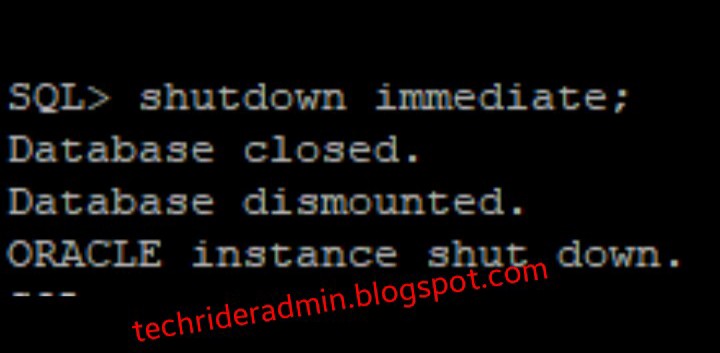
            1. Shutdown immediate:--

            In shutdown immediate in oracle mode all connected user sessions will be disconnected. All current transactions will be terminated. Oracle creates checkpoint and closes all data files.

            Shutdown oracle database on linux


            2. Shutdown transactional:--

            In this mode current transactions are being processed until end . Oracle does not accept new transaction.after end the current transactions checkpoint creates and closes all datafiles.


            3. Shutdown normal:--

            In this mode all connected user sessions are active until disconnected by user.all current transactions and new transactions processes until end. After that oracle creates checkpoint and close datafiles and shutdown the oracle instance.


            4. Shutdown abort:--

            In this mode  oracle shuts down instance forcefully without create checkpoint.


            In this article we learned about the shutdown of Oracle database.stay tune.

            Startup oracle database


            In this tutorial we learn about startup concept of oracle database. There are different stage to startup oracle database.without startup oracle instance we can not access oracle database. 


            Different stages for startup oracle database:

            There are three stages to startup oracle database.these stages are described below.

            Nomount stage:--  this is the first stage to startup oracle database. Some tasks occured during this stage these are described below.


            1.   In this stage oracle reads parameter file from the default location.it also reads if you mention the location along with the startup command other wise it reads from the default location.


            2. During the nomount stage oracle allocates SGA and starts all required background processes.


            3. In this stage oracle database is not attached with the oracle instance.  


            In this stage we use this below command in SQL promt.


            SQL> startup nomount;


            Mount stage:-- This is the second stage to startup oracle database.Some tasks also occured during this stage.

            1. During this stage oracle reads the control file and finds the location of the datafiles which is written in the control file.

            2. During this stage oracle tries to open the datafiles.


            3. Also it the database recovery stage if your database crashes by any reason you can recover at this stage.


            4. During this stage oracle database attached to the oracle instance.


            5. This stage is the maintainance stage for a database administrator. 


            6. Only database admin can access database .no one can access oracle database during this stage.

            After startup the database in nomount mode we need to alter database in mount mode using the below command in the SQL promt.

            SQL>alter database mount;

            We can check the oracle database stage using the below command .


            Startup oracle database


            Open stage:-- This is the last stage to startup a oracle database. Some tasks also occured during this stage.

            1.   In this stage oracle opens all datafiles and Redolog files(which is required for database recovery) .


            2. Every one can access oracle database in this stage. 

            When oracle database is mounted mode we can alter database mode in open state using the below command.

            SQL>alter database open;


            In this lesson we have learned startup concept of oracle database. In the next lesson we will learn shutdown concept of oracle database.
            Stay tune.


            Background processes in oracle 11g database explain


            In this tutorial we will  learn about the background processes in oracle which is running in oracle instance to help data processing for oracle database.


              Background processes in oracle database

              Many processes are running background of an oracle instance.we are going to talk about these processes.
              Background processes in oracle

              DBWR:

              DBWR stands for database writer process . It is used to move the data blocks from db buffer cache to datafiles.

              When user execute some SQL commamd then data is stored into db buffer cache and then it will be move to datafiles of database using DBWR process.
              This process will be executed 

              1.when db buffer cache is full need some space to store data blocks into db buffer cache . 

              2. Second condition oracle database wants to checkpoint the DBWR process occurs. 

              LGWR:

              LGWR stands for log writer process. It is used to move redo log files from redo log buffer to redo log files of oracle database.
              Redo log file is important to recover the oracle database.

              This process executes
              1. Every  three seconds.
              2. When redo log buffer one third full
              3. When DBWR writes dirty buffer to datafiles of oracle database.

               CKPT:

              CKPT stands for checkpoint .it is an oracle event to store SCN no to headers of the datafiles and controlfiles to recover database at the time of requirement.

              It will happen
              1. It checkpoint time out limit exceeded.
              2. If DBA execute alter system switch logfile command.
              3. If DBA issues alter system checkpoint command.

               PMON:

              PMON stands for process monitor. If background processes of instance is failed PMON clears all process by doing these below tasks

              1. Release all lock tables.
              2. Kill all process.
              3. Restarts the dead dispatcher.
              4. Kill all user sessions.

              SMON:

              SMON stands for system monitoring .it is used to recovery an oracle instance.if oracle instance crashes all uncommitted transaction is rolled back. Commited transaction are completed after recovery oracle instance.

              ARCn:

              ARCn stands for archiver process. To start the process archive mode should be on for oracle database.this process archive the redo log files to archiver destination which is required to recover the oracle database.

              In the next article we learn about oracle database architecture and oracle database works.

              ORACLE DATABASE VS ORACLE INSTANCE


              In this tutorial we learn what is oracle instance and what is oracle database.Below picture will help you to know about oracle instance and oracle database.

              Oracle database vs oracle instance


               Oracle instance:

              Oracle instance combination of background process such as (dbwr,lgwr,ckpt,pmon,smon and so on) and allocated memory (SGA) which is used by the oracle database. Background process will help to feed the data into oracle database.


              One oracle database can associate with more than one instance but oracle instance must have atleast one database,not more than one database.


              Oracle Database:

              Oracle database is collection of many files such as (datafiles,logfiles,redo log files,archivelog files,control files,password file,parameter files) which located on the filesystem of the hard drive.


              When you startup oracle instance it starts the background process as per written in the parameter file and allocated memory as per written in parameter file. When we shutdown the oracle instance it will deallocated memory and stop all required process but oracle database is collection of physical files which remain same on the server. There will be no impact on the oracle database.


              Physical structure of oracle database consists of datafile, redo log file and control file.


              Datafile:- Datafile is a physical file which stored in physical disk and is used to store the data .


              Redo log file:- Redolog file is also physical file which is stored in physical disk and record all changes made to data. It is used to recover database.


              Control file:- It is also physical file which stored on the physical disk . And it records datafile information and redo information .


              Logical structure of oracle database consists of data blocks, extents , segment and table space.


              Data blocks: It is defined by no of bytes on the physical disk. Oracle data is stored into the data blocks. Defaults size of data blocks is 8 bytes.


              Extents: it is combination of many data blocks.


              Segment: segment makes using no of extents to create logical storage structure.


              Tablespace: data file stores into the table space.one or many datafile is stored into one table space .


              In the next tutorial we know about all required background process which will help to feed data into the oracle database.

              pfile vs spfile in oracle database


              In this tutorial we learn what is pfile and what is spfile in oracle database.What is the difference between spfile and pfile in Oracle database .How to change these parameter file .

              Both spfile and pfile are the parameter files in oracle database which is store the instance parameter value such as (SGA_MAX_size,Shared_pool,listener name ,db name ,db_unique name and so on ) and it is used and initialized defined parameter when startup the oracle instance.


              What is PFILE


              PFILE stand for parameter file .It is normally a text file we can edit this file using the normal editor.If we can use linux system then we can edit it vi editor. This is not recommended by the oracle .The default location is $ORACLE_HOME/dbs/init(SID).ora.we can not take any kind of backup of this PFILE using RMAN.

              We can startup the oracle instance using the pfile using the below command.

              SQL> STARTUP PFILE= init(sid).ora;


              What is SPFILE


              SPFILE stands for server parameter file. This is binary file.we can not edit this file using normal editor. If you edit this file using normal editor it will be corrupted. So we can change the parameter value usong “ALTER SYSTEM” only. Now a days it is recommended by oracle  and we can take RMAN backup of SPFILE.The default location of the SPFILE is $ORACLE_HOME/dbs/spfile(sid).ora.

              If we want to start oracle instance using spfile then we execute the below command.

              SQL>STARTUP;


              How to check server is using spfile or pfile


              You can check server is using spfile or pfile using the below command.

              SQL>SHOW PARAMETER SPFILE;

              If this command gives the output then it will be confirm that server is running using spfile .If no rows comes after executing the above command then it will be confirm that  server is not running with spfile.


              How to create file from spfile and vice versa
              pfile vs spfile


              We can create pfile from spfile using the below command.

              SQL>CREATE PFILE = ‘$ORACLE_HOME/dbs/init(sid).ora’ from SPFILE;

              and it is useful when mistakenly spfile is corrupted we can create spfile from this pfile also using the below command.

              SQL>CREATE SPFILE FROM PFILE =’$ORACLE_HOME/dbs//init(sid).ora’


              In this tutorial we have learned about pfile and spfile of Oracle.


              Difference between OLTP vs OLAP in database


              OLTP vs OLAP in database


              In this tutorial we will learn  the concept of OLTP  vs  OLAP in database. Every dba should know the concept of OLTP and OLAP.

              OLTP vs OLAP


              What does OLTP stand for:-

              OLTP stands for online transaction processing. Normally we create OLTP database for ongoing transaction environment and OLTP database is used for day to day transaction activity for business need. As day to day transaction activities are happening therefore data always up-to-date.OLTP database stores current data for day to day activity.  Database size of OLTP database normally calculated in GB.OLTP database is handled by large no of people .


              We can found details data in OLTP database for business requirements.Datas in the OLTP database found in normalized manner as many small tables are linked with each other using join function.OLTP database normally used by DBA.Normally OLTP database supports read and write both operation .


              OLTP Example:- 

              Any e-commerce sites use OLTP database for day to day business transaction.


              What does OLAP stand for :-

              OLAP stands online analytical processing.Normally we create OLAP database for create report as well as dashboard for decision making and trending  analysis. It stores historical summarised data to create report and dashboard. Data comes from OLTP database for that data is not frquently updated and data stores in OLAP database in denormalized Mannar.OLAP Database normally used by MD ,CEO for decision making purpose.

              OLAP database normally use to analysis data to make bussiness decision so that OLAP database stores historical data to analysis data for results which is necessary to make decisions.Database size of OLAP database normally calculated in TB as large no of records is stored into OLAP database .OLAP database is handled by few no of people .Normally OLAP databse supports only read operation. 

              OLAP Example:- 

              If  we need any report for decision making for past 15 years we need OLAP database to make  dashboard using OLAP summarised data.


              In this tutorial we have learned the concept of OLTP  vs  OLAP in database.


              Multiplex oracle control file


              Multiplex oracle control file

              Control file is very crucial for oracle database because it holds the physical record of database. It is recommended that every database must have multiple control file to avoid the risk of losing control file due to corruption for the unexpected failure of system or accidental removal and it is recommended that each control file placed at different  location for security reason.
              We are going to create another control file named control03.ctl under the oracle directory.

              View the location of existing control file

              To view the existing control file location use the run following command on the sql promt.
              SQL>  show parameter control_files;

              NAME                                 TYPE        VALUE
              ------------------------------------ ----------- ------------------------------
              control_files                        string      /oracle/oradata/orcl/control01
                                                               .ctl, /oracle/flash_recovery_a
                                                               rea/orcl/control02.ctl


              Update the Parameter file

              To update the new location and name of the new control file in the parameter file of the database use the following command on sql promt
              SQL> alter system set control_files='/oracle/oradata/orcl/control01.ctl',
                2  '/oracle/flash_recovery_area/orcl/control02.ctl',
                3  '/oracle/control03.ctl'
                4  scope=spfile;

              Shutdown database

              To complete the above activity we shutdown the database to perform rest of the work.To shutdown the database we run the below command on the sql promt.
              SQL> shut immediate;
              Database closed.
              Database dismounted.
              ORACLE instance shut down.


              Copy the control file

              Now copy the existing control file to the new location in operating system level.To do this activity weun the below command.
              [oracle@db ~]$ cp /oracle/oradata/orcl/control01.ctl /oracle/control03.ctl


              Startup database


              After completing the above step we startup the database run the below command

              SQL> startup
              ORACLE instance started.

              Total System Global Area 2071076864 bytes
              Fixed Size                  2214896 bytes
              Variable Size            1291846672 bytes
              Database Buffers          771751936 bytes
              Redo Buffers                5263360 bytes
              Database mounted.
              Database opened.

              Now verify the contol files using this command.

              SQL> select name from v$controlfile;

              NAME
              --------------------------------------------------------------------------------
              /oracle/oradata/orcl/control01.ctl
              /oracle/flash_recovery_area/orcl/control02.ctl
              /oracle/control03.ctl

              To un the above command we find the another control file named control03.ctl located /oracle directory.


              oracle database controlfile
              oracle database controlfile

              How Archive log mode in oracle enable


              How to enable Archive log mode in oracle

               Enabling of archive log mode in oracle  database is necessary to enable  most of the high availability features of oracle.If we enable this mode redo log files which store the log record of frequently change occurred in the database will be archived.
              RMAN,redo logs files are  used archivelog for their operation.
              To enable Archivelog file is very simple. connect the database in mounted mode and it should be not open state.Then alter the database in archivelog mode.

              Redo log files are very essential file to recover oracle database in case oracle instance crashes  by any reason. Now in oracle database many redo log files are created a group.

              Redo group is very important while archiving redo log files.suppose group 2 is current that means oracle uses these redo log files which present in group 2 and archive process then archiving redo log files from other group.for that reason database performance is not degraded.


              To view the archivelog mode in oracle 

              First we have to check the log_mode of the database,is it archivelog mode or not.To run the below command we find the database is set to no archivelog mode. you can run both the command to view the log mode of the database.
              SQL> select log_mode from v$database;

              LOG_MODE
              ------------

              NOARCHIVELOG

               or
              SQL> archive log list;
              Database log mode              No Archive Mode
              Automatic archival             Disabled
              Archive destination            USE_DB_RECOVERY_FILE_DEST
              Oldest online log sequence     18
              Current log sequence           20


              Shutdown database


              After checking the log mode we shutdown the database to perform rest of the work.To shutdown the database we run the below command on the sql promt.


              SQL> shutdown immediate;
              Database closed.
              Database dismounted.
              ORACLE instance shut down.

              Startup database in mount mode


               Now we can startup the database in mount mode and alter it in archivelog mode.

              SQL> startup mount;
              ORACLE instance started.

              Total System Global Area 2071076864 bytes
              Fixed Size                  2214896 bytes
              Variable Size            1291846672 bytes
              Database Buffers          771751936 bytes
              Redo Buffers                5263360 bytes
              Database mounted.

              SQL> alter database archivelog;

              Database altered.

              SQL> alter database open;

              Database altered.


              We alter the database in archivelog mode by using the command “alter database archivelog”. oracle don’t give us privilege to do the operation unless we start the database in mount mode and also in open state. After alter the database in archivelog mode we alter the database using “alter database open” command.

              Now it is the time to verify that the log_mode of the database.we rrun the below command to do this.
                

              SQL> archive log list;
              Database log mode              Archive Mode
              Automatic archival             Enabled
              Archive destination            USE_DB_RECOVERY_FILE_DEST
              Oldest online log sequence     18
              Next log sequence to archive   20
              Current log sequence           20


              Archive log mode in oracle
              Archivelog-oracle-database


              In this tutorial we have learned what is archivelog mode and how to enable Archivelog mode in oracle database .