Showing posts with label haproxy. Show all posts

How to enable HAProxy stats on CentOS 7 server step by step guide


In this tutorial we learn how to enable HAProxy stats on centos server.We can  get lot of info like data transfer, node status, connection status using HAProxy stats . After installing HAProxy we should enable HAProxy stats to get information through web browser.

Enable HAProxy stats on centos server

To enable HAProxy stats first we need to go haproxy configuration file and edit this file and add the below lines after default section.


listen  stats   192.168.137.6:3000
        mode            http
  
        maxconn 10

        timeout client          300s
        timeout server        300s
        timeout connect     300s
        timeout queue        300s

        stats enable
        stats refresh 10s
        stats show-node
        stats auth haproxyadmin:haproxyadmin
        stats uri  /haproxy


After doing the above configuration we can access using the below link through the web browser.


http://192.168.137.6:3000/haproxy


username : haproxyadmin
password:   haproxyadmin


How to enable HAProxy stats on CentOS 7 server step by step guide


you can change the auth parameter using stats auth parameter and also you can change uri parameter as per your choice.


That’s all. We have enabled HAProxy stats if this article helpful please share it!!!!!


How to install and configure HAProxy on centos 7 step by step guide


In this article we learn what is HAProxy and how to setup and configure HAProxy on centos 7 server .

What is HAProxy

HAProxy is a free, very fast and reliable solution which provides high availability ,load balancing and proxying for the TCP and HTTP based application.

 Installtion of HAProxy on centos server

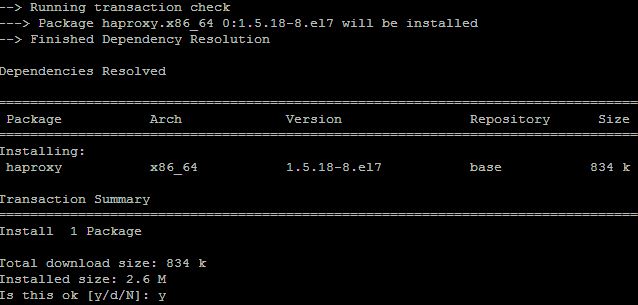
HAProxy package is available in the default centos repo. To install the HAProxy package we need to execute the below command.

[root@localhost ~]# yum install haproxy
How to install and configure HAProxy on centos 7 step by step guide


Configuration of HAProxy on centos server


To configure HAProxy as per our requirement we need to go its configuration file which is located at “/etc/haproxy/haproxy.cfg”
Sample configure file as below.
global
        daemon
        maxconn 256
        log         127.0.0.1 local2

    defaults
        timeout queue           1m
        timeout connect         10s
        timeout client          1m
        timeout server          1m
        timeout http-keep-alive 10s
        timeout check           10s

    listen http 192.168.137.6:80
       mode http
       balance roundrobin
       server server1 192.168.137.5:8080
       server server2 192.168.137.4:8080

When any request hits on the ip 192.168.137.6 on port 80 it will be redirected on server1 and server2 ip addresses along with their respective ports.

And also we can change our configuration parameter as per our requirement .
Mode: you can change it either”http” or “tcp” as per requirement.

Balance: you can change also load balancing method as per requirement.

After configuring all the above stuff we can start the haproxy service and enable it at startup mode.

#systemctl start haproxy
#systemctl enable haparoxy


That’s all.We have configured haproxy if this article helpful please share it!!