Showing posts with label python. Show all posts

How to create and show table in mysql database using python on CentOS and RHEL 6/7 step by step guide


How to create and show table in  mysql database using python on CentOS and RHEL 6/7  step by step guide


In this article we will learn how to create mysql table in  database using python language.

We need to install the mysql.connector module using the below command.

#pip3 install mysql.connector

Normally we create mysql table into database using “create table” statement and select the database in which mysql table will be created.

How to create mysql table into databse using python

First we need to create one file named createtable.py and enter the below code into this file  .

import mysql.connector

mydb = mysql.connector.connect(
  host="localhost",
  user="root",
  passwd="abc123",
  database=” pythonclass”
)
cur = mydb.cursor()
cur.execute("CREATE TABLE student (name VARCHAR(30), location VARCHAR(100))")

How to execute the python progam

To execute the python program we need to execute the below command.
[root@localhost ~]# python3 createtable.py

After executing the above command new table has been created.

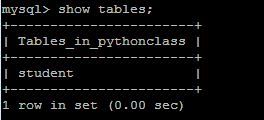
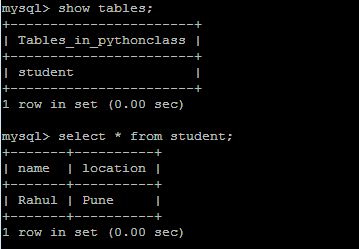
Now enter the mysql promt and verify it is created or not using “show tables” statement.


mysql> show tables;
+-----------------------+
| Tables_in_pythonclass |
+-----------------------+
| student               |
+-----------------------+
1 row in set (0.00 sec)
How to create and show table in  mysql database using python on CentOS and RHEL 6/7  step by step guide
How to create and show table in  mysql database using python on CentOS and RHEL 6/7  step by step guide

How to view mysql database table using python

We also can check created table list using python program.

We create one file name showtable.py and enter the below command.

import mysql.connector

mydb = mysql.connector.connect(
  host="localhost",
  user="root",
  passwd="abc123"
  database=”pythonclass”
)

cur = mydb.cursor()

cur.execute("SHOW TABLES")

for x in cur:
  print(x)


That’s all. If this article is helpful please share it!!!!


How to install pip3 on CentOS and RHEL 6/7 step by step guide


How to install pip3  on CentOS and RHEL 6/7  step by step guide

In this article we will learn how to install pip3 on CentOS and RHEL linux system which is very useful to install python packages for that reason it is called as python package manager.
How to install pip3  on CentOS and RHEL 6/7  step by step guide
How to install pip3  on CentOS and RHEL 6/7  step by step guide

How to install Pip on CentOS and RHEL  linux system

 Pip package is not available the redhat or centos repo. We need to install epel to install the pip package.To install pip on the linux system we need to execute the below commands.

#yum install epel-release
#yum install python-pip

After install this package we need to verify .

How to verify the version of pip

To verify the pip version which you have installed  execute the below commands.

#pip –V 
#pip3 –V

How to run pip to manage python packages

To manage python package ( install ,uninstall and search ) using pip we need to execute the below commands.

#pip install <package_name>
#pip uninstall <package_name>
#pip search <package_name>

That’s all. If this article is helpful please share it!!!!


Please Donate To Bitcoin Address: [[address]]

Donation of [[value]] BTC Received. Thank You.
[[error]]

How to upgrade pip3 on CentOS and RHEL 6/7 step by step guide


How to upgrade pip3  on CentOS and RHEL 6/7  step by step guide

In this article we will learn how to install pip3 on CentOS and RHEL system which is very useful to install python packages for that reason it is called as python package manager.

How to install Pip on CentOS and RHEL  linux system
 

Pip package is not available the redhat or centos repo. We need to install epel to install the pip package.To install pip on the linux system we need to execute the below commands.

#yum install epel-release
#yum install python-pip

After install this package we need to verify the version of pip .

How to verify the version of pip

To verify the pip version which you have installed  execute the below commands.

#pip –V 
#pip3 –V

How to upgrade the version of pip

To upgrade version of pip we need to execute the below command.

# pip3.6 install --upgrade pip

Collecting pip
  Downloading https://files.pythonhosted.org/packages/5c/e0/be401c003291b56efc55aeba6a80ab790d3d4cece2778288d65323009420/pip-19.1.1-py2.py3-none-any.whl (1.4MB)
    100% |████████████████████████████████| 1.4MB 8.0kB/s
Installing collected packages: pip
  Found existing installation: pip 9.0.1
    Uninstalling pip-9.0.1:
      Successfully uninstalled pip-9.0.1
Successfully installed pip-19.1.1
How to upgrade pip3  on CentOS and RHEL 6/7  step by step guide
How to upgrade pip3  on CentOS and RHEL 6/7  step by step guide 


How to run pip to manage python packages

To manage python package ( inatall ,uninstall and search ) using pip we need to execute the below commands.

#pip install <package_name>
#pip uninstall <package_name>
#pip search <package_name>

Example:
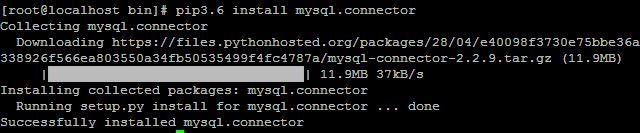
# pip3.6 install mysql.connector

Collecting mysql.connector
  Downloading https://files.pythonhosted.org/packages/28/04/e40098f3730e75bbe36a338926f566ea803550a34fb50535499f4fc4787a/mysql-connector-2.2.9.tar.gz (11.9MB)

That’s all. If this article is helpful please share it!!!!


Please Donate To Bitcoin Address: [[address]]

Donation of [[value]] BTC Received. Thank You.
[[error]]

How to delete value from table of mysql database using python on CentOS and RHEL 6/7 step by step guide


How to delete value from table of mysql database using python on CentOS and RHEL 6/7  step by step guide


In this article we will learn how to dalete value from table using python language.

We need to install the mysql.connector module using the below command.

#pip3 install mysql.connector

Please follow the below link to insert value into table using python language.

https://techrideradmin.blogspot.com/2019/06/how-to-insert-value-into-table-of-mysql-using-python-on-centos-rhel-step-by-step-guide.html

How to delete value from table using python

First we need to create one file named delete.py and enter the below code into this file  .
import mysql.connector

mydb = mysql.connector.connect(
  host="localhost",
  user="root",
  passwd="abc123",
  database="pythonclass"
)

cur = mydb.cursor()

query = "DELETE FROM student WHERE location = 'Mumbai'"

cur.execute(query)

mydb.commit()

for affect the row mydb.commit() method is required.

 How to execute the python progam

To execute the python program we need to execute the below command.

[root@localhost ~]# python3 delete.py


After executing the above command record has been deleted from the table.

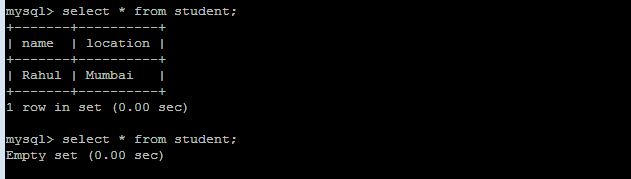
Now enter the mysql promt and verify it is deleted   or not using “select” statement.


mysql> select * from student;
How to delete value from table of mysql database using python on CentOS and RHEL 6/7  step by step guide
How to delete value from table of mysql database using python on CentOS and RHEL 6/7  step by step guide


That’s all. If this article is helpful please share it!!!!


How to update value into table of mysql database using python on CentOS and RHEL 6/7 step by step guide


How to update value into table of mysql database using python on CentOS and RHEL 6/7  step by step guide


In this article we will learn how to update value into table using python language.

We need to install the mysql.connector module using the below command.

#pip3 install mysql.connector

Please follow the below link to insert value into table using python language.

https://techrideradmin.blogspot.com/2019/06/how-to-insert-value-into-table-of-mysql-using-python-on-centos-rhel-step-by-step-guide.html

How to update value into table using python

First we need to create one file named update.py and enter the below code into this file  .
import mysql.connector

mydb = mysql.connector.connect(
  host="localhost",
  user="root",
  passwd="abc123",
  database="pythonclass"
)

cur = mydb.cursor()

query = "UPDATE student SET location = 'Mumbai' WHERE location = 'Pune'"

cur.execute(query)

mydb.commit()

for affect the row mydb.commit() method is required.

How to execute the python progam

To execute the python program we need to execute the below command.

[root@localhost ~]# python3 update.py


After executing the above command record has been updated into  the table.

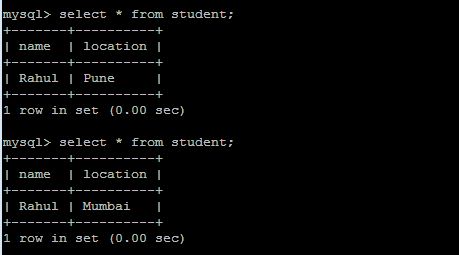
Now enter the mysql promt and verify it is updated  or not using “select” statement.


mysql> select * from student;
How to update value into table of mysql database using python on CentOS and RHEL 6/7  step by step guide
How to update value into table of mysql database using python on CentOS and RHEL 6/7  step by step guide


That’s all. If this article is helpful please share it!!!!


How to fetch value from table of mysql database using python on CentOS and RHEL 6/7 step by step guide


How to fetch value from table of mysql database using python on CentOS and RHEL 6/7  step by step guide


In this article we will learn how to fetch value table using python language.
We need to install the mysql.connector module using the below command.

#pip3 install mysql.connector

Please follow the below link to insert value into table using python language.

https://techrideradmin.blogspot.com/2019/06/how-to-insert-value-into-table-of-mysql-using-python-on-centos-rhel-step-by-step-guide.html

How to fetch value from table using python

First we need to create one file named fetch.py and enter the below code into this file  .

import mysql.connector


mydb = mysql.connector.connect(

  host="localhost",

  user="root",

  passwd="abc123",

  database="pythonclass"

)


cur = mydb.cursor()


cur.execute("select * from student")

result = cur.fetchall()

for x in result:
     print(x)

 How to execute the python progam

To execute the python program we need to execute the below command.
[root@localhost ~]# python3 fetch.py


output:
[root@localhost project]# python3 fetch.py
('Rahul', 'Pune')
How to fetch value from table of mysql database using python on CentOS and RHEL 6/7  step by step guide
How to fetch value from table of mysql database using python on CentOS and RHEL 6/7  step by step guide

After executing the above command record has been fetched from  the table.

Now enter the mysql promt and verify it is created or not using “select” statement.


mysql> select * from student;

mysql> select * from student;
+-------+----------+
| name  | location |
+-------+----------+
| Rahul | Pune     |
+-------+----------+
1 row in set (0.00 sec)


That’s all. If this article is helpful please share it!!!!


Please Donate To Bitcoin Address: [[address]]

Donation of [[value]] BTC Received. Thank You.
[[error]]

How to insert value into table of mysql database using python on CentOS and RHEL 6/7 step by step guide


How to insert value into table of mysql database using python on CentOS and RHEL 6/7  step by step guide


In this article we will learn how to insert value into table using python language.
We need to install the mysql.connector module using the below command.

#pip3 install mysql.connector

Please follow the below link to create table using python language.

https://techrideradmin.blogspot.com/2019/06/how-to-create-and-show-table-in-mysql-using-python-on-centos-rhel-step-by-step-guide.html

How to insert value into table using python

First we need to create one file named insert.py and enter the below code into this file  .

import mysql.connector


mydb = mysql.connector.connect(

  host="localhost",

  user="root",

  passwd="abc123",

  database="pythonclass"

)


cur = mydb.cursor()


query = "INSERT INTO student (name, location) VALUES (%s, %s)"

value = ("Rahul", "Pune")

cur.execute(query, value)


mydb.commit()


Row will be effected after execute the mydb.commit() command.
You can enter multiple row into table using executemany() method.

How to execute the python progam

To execute the python program we need to execute the below command.

[root@localhost ~]# python3 insert.py

After executing the above command record has been inserted into the table.

Now enter the mysql promt and verify it is inserted or not using “select” statement.


mysql> select * from student;

mysql> select * from student;
+-------+----------+
| name  | location |
+-------+----------+
| Rahul | Pune     |
+-------+----------+
1 row in set (0.00 sec)
How to insert value into table of mysql database using python on CentOS and RHEL 6/7  step by step guide
How to insert value into table of mysql database using python on CentOS and RHEL 6/7  step by step guide


That’s all. If this article is helpful please share it!!!!


Please Donate To Bitcoin Address: [[address]]

Donation of [[value]] BTC Received. Thank You.
[[error]]

How to create and show mysql database using python on CentOS and RHEL 6/7 step by step guide


How to create and show mysql database using python on CentOS and RHEL 6/7  step by step guide


In this article we will learn how to create mysql database using python language.

We need to install the mysql.connector module using the below command.

#pip3 install mysql.connector
How to create and show mysql database using python on CentOS and RHEL 6/7  step by step guide
How to create and show mysql database using python on CentOS and RHEL 6/7  step by step guide
Normally we create mysql database using “create database” statement.

How to create mysql databse using python

First we need to create one file named createdatabase.py and enter the below code into this file  .

import mysql.connector

mydb = mysql.connector.connect(
  host="localhost",
  user="root",
  passwd="abc123"
)
cur = mydb.cursor()
cur.execute("CREATE DATABASE pythonclass")

How to execute the python progam

To execute the python program we need to execute the below command.

[root@localhost ~]# python3 createdatabase.py

After executing the above command new database has been created.

Now enter the mysql promt and verify it is created or not using “show databases” statement.

How to create mysql databse using python

We also can check database list using python program.

We create one file name showdatabase.py and enter the below command.

import mysql.connector

mydb = mysql.connector.connect(
  host="localhost",
  user="root",
  passwd="abc123"
)

cur = mydb.cursor()

cur.execute("SHOW DATABASES")

for x in cur:
  print(x)


That’s all. If this article is helpful please share it!!!!


How to write a small python program on CentOS and RHEL 6/7 step by step guide


How to write a small python program on CentOS and RHEL 6/7  step by step guide


In this article we will learn how to write a small python program on linux system and how to execute this program using python.

Before write a python program we need to check two things.

1)First we need to install python on the system.


2)we need to check python binaries is installed on the system or not. To verify this we need to execute the below commands.

[root@localhost ~]# which python
/usr/bin/python
[root@localhost ~]# whereis python
python: /usr/bin/python2.6 /usr/bin/python /usr/lib/python2.6 /usr/lib64/python2.6 /usr/include/python2.6 /usr/share/man/man1/python.1.gz

Write  a small program using python

First we need to create one file named test.py and enter the below code  .

#!/usr/bin/python
print (" WELCOME TO TECHRIDERADMIN")

How to execute the python progam

To execute the python program we need to execute the below command.

[root@localhost ~]# python test.py
 WELCOME TO TECHRIDERADMIN
How to write a small python program on CentOS and RHEL 6/7  step by step guide
How to write a small python program on CentOS and RHEL 6/7  step by step guide


That’s all. If this article is helpful please share it!!!!