Showing posts with label NAT. Show all posts

How to configure dynamic nat in cisco router using packet tracer step by step guide


How To Configure Dynamic NAT in Cisco Router | In this article we will learn what is dynamic  nat , how to configure dynamic  nat and after configuring verify the dynamic  nat in cisco router using packet tracer software.

Suppose in an organization we have reserved private network (192.168.1.0/24) to use to communicate among the users. If all users want to access to the internet then dynamic nat plays an important role to fulfill this requirement.

Private ip address Range

Class A => 10.0.0.0  to 10.255.255.255
Class B => 172.16.0.0 to 172.31.255.255
Class C=> 192.168.0.0 to 192.168.255.255

 Type of NAT

Three types of nats are available.


What is Dynamic NAT

In the dynamic nat router is configured a pool of ipv4 address . when user want to access to internet then node request to router to mapping public ip address to the corresponding private ipaddress. 

Lab Diagram
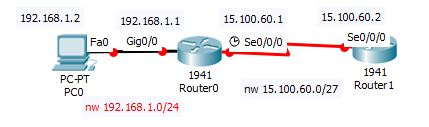
 
How to configure dynamic  nat in cisco router using packet tracer
                           How to configure dynamic  nat in cisco router using packet tracer
In the above diagram we configure dynamic nat in cisco router using packet tracer software.

Configuration of dynamic nating

To configure dynamic nat below some steps we have to follow.

  1. Create a pool of public ip addresses to the router to map the private ip addresses.
  2. Create an access list to permit ip addresses which to be translated.
  3. Map the pool to the access list.
  4. Finally apply nat configuration  to the router interface.

In  the above diagram we have a private network 192.168.1.0/24 which to be mapped to public network which is 15.100.60.0/27. To configure it we follow the below steps.

Router(config)#ip nat pool mypool 15.100.60.3 15.100.60.30 netmask 255.255.255.0
Router(config)#ip access-list extended mypool
Router(config-ext-nacl)#permit ip 192.168.1.0 0.0.0.255 any
Router(config-ext-nacl)#exit
outer(config)#ip nat inside source list mypool pool mypool
Router(config)#int gig0/0
Router(config-if)#ip nat inside
Router(config-if)#exit
Router(config)#int se0/0/0
Router(config-if)#ip nat outside
Router(config-if)#exit
Router(config)#

verify of dynamic nating

After configuring dynamic nating we need to verify it. To verify it we execute the below command.

Router#sh ip nat statistics
Total translations: 0 (0 static, 0 dynamic, 0 extended)
Outside Interfaces: Serial0/0/0
Inside Interfaces: GigabitEthernet0/0
Hits: 0 Misses: 0
Expired translations: 0
Dynamic mappings:
-- Inside Source
access-list mypool pool mypool refCount 0
pool mypool: netmask 255.255.255.0
start 15.100.60.3 end 15.100.60.30
type generic, total addresses 28 , allocated 0 (0%), misses 0

If this article is helpful to know about How To Configure Dynamic NAT in Cisco Router please share and subscribe this article.


Please Donate To Bitcoin Address: [[address]]
Donation of [[value]] BTC Received. Thank You.
[[error]]

How to configure nat overload in cisco router using packet tracer step by step guide


In this article we will  learn what is  nat overload(PAT), how to configure  nat overload in cisco router using packet tracer software.

Normally we use private ip inside the organization which is not allow to users to access the internet,then we use dynamic nat to fulfill our purpose. If ISP not provides organization pool of ip address then we go the another option which is called NAT overload(PAT).

Private ip address Range

Normally we use private ip address which is reserved inside the organization to communicate internal purpose which is not public ip address. The ange are given below.

Class A => 10.0.0.0  to 10.255.255.255
Class B => 172.16.0.0 to 172.31.255.255
Class C=> 192.168.0.0 to 192.168.255.255

Type of NAT

Three types of nats are available.


What is NAT overload

In the dynamic nating we saw that ISP provides us a pool of public ip address to map with internal private ip to access internet. If ISP gives us few public ip addresses or 1 public ip address instead a pool of public ip addresses to map internal private ip addresses to access internet. In this scenario NAT overload is configured to overcome the problem.

Lab Diagram

How to configure nat overload in cisco router using packet tracer

                         How to configure nat overload in cisco router using packet tracer


In the above diagram we configure nat overload in cisco router using packet tracer software.

Configuration of NAT overload(PAT)

If ISP gives us few ip addresses or even 1 ip address so we can eliminate the netmask keyword from the dynamic nating command.

Router(config)#ip nat pool mypool 15.100.60.3 15.100.60.4
Router(config)#ip access-list extended mypool
Router(config-ext-nacl)#permit ip 192.168.1.0 0.0.0.255 any
Router(config-ext-nacl)#exit

Here we use only two public ip addesses to map with the internal private ip addresses.Finally we bind the access list with pool and use overload keyword end of the command.

Router(config)#ip nat pool inside source list mypool pool mypool overload


In this article we have   learned what is  nat overload(PAT), how to configure  nat overload in cisco router using packet tracer software.


How to configure static nat in cisco router using packet tracer step by step guide


Static Nat Configuration | In this article we learn what is static nat , how to configure static nat and after configuring verify the static nat in cisco router using packet tracer software.

What is NAT

Two types of ip address are available in the network terminology. one is public address and other is private address. In an organization internal network should use private ip address to communicate each other ,normally is called LAN. These ip addresses not used for the internet .They can not connect to the internet .To overcome the limitation NAT is come to play is vital role .private ip address is mapped to the public ip address to communicate to the internet  and its hide the private ip address.  

Type of NAT

Three types of nats are available .

Static nat: static nating is the type of nat where one private ip is mapped to the public ip address.This is basically use when we are going to host webserver publicly.

Lab Diagram

 
How to configure static nat in cisco router using packet tracer,Static Nat Configuration
Static Nat Configuration

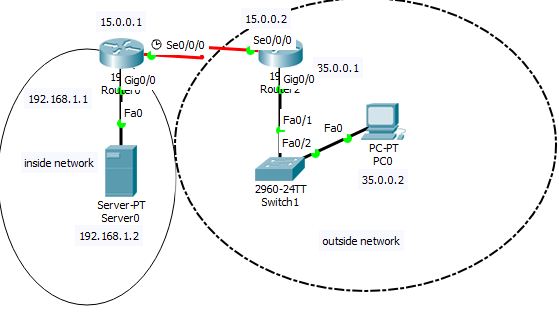
          How to configure static nat in cisco router using packet tracer


In the above diagram we configure static nat in cisco router using packet tracer software.

Static Nat Configuration

In the internal network we have one web server with private ip address 192.168.1.2 and its gateway is 192.168.1.1 which is configured in the router gig 0/0 interface .In the above diagram there is another network which is 15.0.0.0/8 and there is another network which is 35.0.0.0/8 both two networks  are public.


We are going to mapping web server private ip (192.168.1.2) to public ip (15.0.0.3).
To configure it we need to execute the below steps.

Router>en
Router#conf t
Enter configuration commands, one per line. End with CNTL/Z.
Router(config)#ip nat inside source static 192.168.1.2 15.0.0.3
Router(config)#int gig0/0
Router(config-if)#ip nat inside
Router(config-if)#exit
Router(config)#int se0/0/0
Router(config-if)#ip nat outside
Router(config-if)#exit

We have configured static nat to execute the above commands.

 Verify  of static nating

After configured static nating we need to verify it whether it is configured or not.To verify it we ping the webserver from the outside network.
Before configure static nat when we going to ping the webserver from the outside network it get the following output.

Packet Tracer PC Command Line 1.0
C:\>ipconfig

FastEthernet0 Connection:(default port)

Link-local IPv6 Address.........: FE80::290:21FF:FE1D:19C0
IP Address......................: 35.0.0.2
Subnet Mask.....................: 255.0.0.0
Default Gateway.................: 35.0.0.1

C:\>ping 192.168.1.2

Pinging 192.168.1.2 with 32 bytes of data:

Request timed out.
Reply from 192.168.1.2: bytes=32 time=22ms TTL=126
Reply from 192.168.1.2: bytes=32 time=16ms TTL=126
Reply from 192.168.1.2: bytes=32 time=15ms TTL=126

Ping statistics for 192.168.1.2:
Packets: Sent = 4, Received = 3, Lost = 1 (25% loss),
Approximate round trip times in milli-seconds:
Minimum = 15ms, Maximum = 22ms, Average = 17ms

After configure static nat when we going to ping the webserver from the outside network it get the following output.

C:\>ping 192.168.1.2

Pinging 192.168.1.2 with 32 bytes of data:

Reply from 15.0.0.3: bytes=32 time=17ms TTL=126
Reply from 15.0.0.3: bytes=32 time=11ms TTL=126
Reply from 15.0.0.3: bytes=32 time=23ms TTL=126
Reply from 15.0.0.3: bytes=32 time=17ms TTL=126

Ping statistics for 192.168.1.2:
Packets: Sent = 4, Received = 4, Lost = 0 (0% loss),
Approximate round trip times in milli-seconds:
Minimum = 11ms, Maximum = 23ms, Average = 17ms

We execute another command to verify the static natting.

Router#sh ip nat translations
Pro Inside global Inside local Outside local Outside global
--- 15.0.0.3 192.168.1.2 --- ---
tcp 15.0.0.3:80 192.168.1.2:80 35.0.0.2:1025 35.0.0.2:1025
tcp 15.0.0.3:80 192.168.1.2:80 35.0.0.2:1026 35.0.0.2:1026

If this article is helpful to know about Static Nat Configuration please share and subscribe this article.