Showing posts with label LINUX. Show all posts

How to install crontab in linux system step by step guide


How to install crontab in linux system step by step guide

In this article we learn how to install crontab in linux system, how to verify crontab package is successfully installed or not, how to start cron service and how to start cron service after booting the system automatically.

We also learn how to edit the crontab and after edit thr crontab how to listing these cron entries.

By default cron package is installed but some case it is not installed . to install it we need to follow the below procedure.

How to check crontab installed or not in the linux system

To check it we need to execute the below command.
#crontab -l 

If crontab is not install we get the following output of the above command.
[root@localhost ~]# crontab -l
-bash: /usr/bin/crontab: No such file or directory

How to install the crontab package

To install the crontab package we need to install cronie package.to install the cronie package we execute the below command.

#yum install cronie

How to install crontab in linux system step by step guide


After installing the cronie package we need to verify it it is installed or nor. To verify it we execute the below command.

[root@localhost ~]# rpm -qa cronie
cronie-1.4.4-16.el6_8.2.x86_64

How to start cron service

To start cron service we execute the below command.

[root@localhost ~]# service crond start
Starting crond:                                            [  OK  ]

To start the cron service automatically after booting the system we need to execute the below command.

[root@localhost ~]# chkconfig crond on


How to add crontab to execute a task automatically


We can schedule a task on a regular interval using crontab utility. To add a specific task to execute automatically on a regular interval we can do it using the below command.
#crontab –e

For a particular user we can set crontab using the below command.
#crontab –u username –e

How to list crontab which we have added to execute automation task


After adding crontab we need to verify the crontab using the below command.
#crontab –l

For a particular user we can list crontab using the below command.
#crontab –u username –l


How to configure fibre channel over Ethernet on linux step by step guide


How to configure fibre channel over Ethernet on linux step by step guide

In this article we learn how to configure fibre channel oner Ethernet on linux system step by step.

What is FCoE

FcoE is a storage protocol which established a communication of the fibre channel over the Ethernet and encapsulated fibre channel frame over the Ethernet.


Pre-requisite of LAB to configure fibre channel over Ethernet on linux

We need two packages to configure fibre channel over Ethernet on linux. one is fcoe-utils and other is lldpad. If these two packages are not installed into the system we nedd to install these two packages to configure FCoE on linux system.

To install these two packages into the linux system we execute the below command.

#yum install fcoe-utils lldpad –y

Procedure to configure fibre channel over Ethernet on linux

Step1: After installing these two packages, there is a default file ifcfg-ethx which is located at /etc/fcoe. We have to copy this file to our desired interface.
Suppose our desire interface is ifcfg-ethy. So we execute the below command.

#cp /etc/fcoe/ifcfg-ethx /etc/fcoe/ifcfg-ethy

Step2: After doing this we edit the  /etc/fcoe/ifcfg-ethy file and change the DCB_REQUIRED parameter value to NO(if dcbclient is not required). By default this parameter value set to yes.

How to configure fibre channel over Ethernet on linux step by step guide

How to configure fibre channel over Ethernet on linux step by step guide


Step3: Now go to the /etc/sysconfig/network-scripts directory and select your desired interface which you are going to configure as FCoE and edit the interface and change onboot parameter to yes to enable the startup mode.

Step4: now start the lldpad service and fcoe service and also enable these service at the startup mode to execute the below command.

#service lldpad start;service fcoe start
#chkconfig lldpad on;chkconfig fcoe on

Step5: Now check your configuration is it successfuly configured or not to execute the below command.

#fcoeadm -i


Please Donate To Bitcoin Address: [[address]]
Donation of [[value]] BTC Received. Thank You.
[[error]]

How to create a shell script using the conditional statement on CentOS and RHEL 6/7 step by step guide


How to create a shell script using the conditional statement on CentOS and RHEL 6/7  step by step guide


In this article we will learn how to create a shell script using the conditional statement  and execute it on CentOS and RHEL linux system and we are going to create a script with bash if  statement to demonstrate example.


Shell script is very powerful language for a system admin to execute the daily basic staff.


In this article we use if else statement to understand the example.
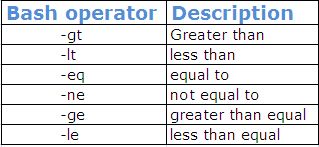
Following bash operators are useful to write a conditional shell script program.
bash operator in shell script for linux unix system| techrideradmin,bash if
bash operator in shell script for linux unix system| techrideradmin

How to create a shell script using if else statement on linux system

======================================================================
Now we are going to write one small shell script program to understand how conditional statement works in the shell script program on the linux system  .


First we create one empty file named condition .sh using the below command.

#touch condition.sh

After creating empty file we enter the below line to create bash if statement in the file. 

#!/bin/bash
echo How old are you?
read  age
if [ “$age” –gt 25 ] then
echo you can drive
else
echo you can not drive
fi

note: we shoule use #!/bin/bash to identify this script only run in bash shell not the other shell .

 How to execute the shell script program

======================================================================
To execute this program we need to execute the below command.

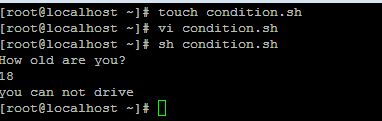
[root@localhost ~]# sh condition.sh

After execute the above command we can find the below output..


Output:
How old are you?
18
you can not drive
How to create a shell script using the conditional statement on CentOS and RHEL 6/7  step by step guide
How to create a shell script using the conditional statement on CentOS and RHEL 6/7  step by step guide

That’s all. If this article is helpful to know about bash if statement please share it!!!!


Please Donate To Bitcoin Address: [[address]]
Donation of [[value]] BTC Received. Thank You.
[[error]]

How to create and show table in mysql database using python on CentOS and RHEL 6/7 step by step guide


How to create and show table in  mysql database using python on CentOS and RHEL 6/7  step by step guide


In this article we will learn how to create mysql table in  database using python language.

We need to install the mysql.connector module using the below command.

#pip3 install mysql.connector

Normally we create mysql table into database using “create table” statement and select the database in which mysql table will be created.

How to create mysql table into databse using python

First we need to create one file named createtable.py and enter the below code into this file  .

import mysql.connector

mydb = mysql.connector.connect(
  host="localhost",
  user="root",
  passwd="abc123",
  database=” pythonclass”
)
cur = mydb.cursor()
cur.execute("CREATE TABLE student (name VARCHAR(30), location VARCHAR(100))")

How to execute the python progam

To execute the python program we need to execute the below command.
[root@localhost ~]# python3 createtable.py

After executing the above command new table has been created.

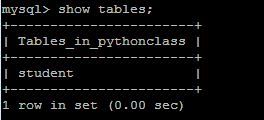
Now enter the mysql promt and verify it is created or not using “show tables” statement.


mysql> show tables;
+-----------------------+
| Tables_in_pythonclass |
+-----------------------+
| student               |
+-----------------------+
1 row in set (0.00 sec)
How to create and show table in  mysql database using python on CentOS and RHEL 6/7  step by step guide
How to create and show table in  mysql database using python on CentOS and RHEL 6/7  step by step guide

How to view mysql database table using python

We also can check created table list using python program.

We create one file name showtable.py and enter the below command.

import mysql.connector

mydb = mysql.connector.connect(
  host="localhost",
  user="root",
  passwd="abc123"
  database=”pythonclass”
)

cur = mydb.cursor()

cur.execute("SHOW TABLES")

for x in cur:
  print(x)


That’s all. If this article is helpful please share it!!!!


How to install pip3 on CentOS and RHEL 6/7 step by step guide


How to install pip3  on CentOS and RHEL 6/7  step by step guide

In this article we will learn how to install pip3 on CentOS and RHEL linux system which is very useful to install python packages for that reason it is called as python package manager.
How to install pip3  on CentOS and RHEL 6/7  step by step guide
How to install pip3  on CentOS and RHEL 6/7  step by step guide

How to install Pip on CentOS and RHEL  linux system

 Pip package is not available the redhat or centos repo. We need to install epel to install the pip package.To install pip on the linux system we need to execute the below commands.

#yum install epel-release
#yum install python-pip

After install this package we need to verify .

How to verify the version of pip

To verify the pip version which you have installed  execute the below commands.

#pip –V 
#pip3 –V

How to run pip to manage python packages

To manage python package ( install ,uninstall and search ) using pip we need to execute the below commands.

#pip install <package_name>
#pip uninstall <package_name>
#pip search <package_name>

That’s all. If this article is helpful please share it!!!!


Please Donate To Bitcoin Address: [[address]]

Donation of [[value]] BTC Received. Thank You.
[[error]]

How to upgrade pip3 on CentOS and RHEL 6/7 step by step guide


How to upgrade pip3  on CentOS and RHEL 6/7  step by step guide

In this article we will learn how to install pip3 on CentOS and RHEL system which is very useful to install python packages for that reason it is called as python package manager.

How to install Pip on CentOS and RHEL  linux system
 

Pip package is not available the redhat or centos repo. We need to install epel to install the pip package.To install pip on the linux system we need to execute the below commands.

#yum install epel-release
#yum install python-pip

After install this package we need to verify the version of pip .

How to verify the version of pip

To verify the pip version which you have installed  execute the below commands.

#pip –V 
#pip3 –V

How to upgrade the version of pip

To upgrade version of pip we need to execute the below command.

# pip3.6 install --upgrade pip

Collecting pip
  Downloading https://files.pythonhosted.org/packages/5c/e0/be401c003291b56efc55aeba6a80ab790d3d4cece2778288d65323009420/pip-19.1.1-py2.py3-none-any.whl (1.4MB)
    100% |████████████████████████████████| 1.4MB 8.0kB/s
Installing collected packages: pip
  Found existing installation: pip 9.0.1
    Uninstalling pip-9.0.1:
      Successfully uninstalled pip-9.0.1
Successfully installed pip-19.1.1
How to upgrade pip3  on CentOS and RHEL 6/7  step by step guide
How to upgrade pip3  on CentOS and RHEL 6/7  step by step guide 


How to run pip to manage python packages

To manage python package ( inatall ,uninstall and search ) using pip we need to execute the below commands.

#pip install <package_name>
#pip uninstall <package_name>
#pip search <package_name>

Example:
# pip3.6 install mysql.connector

Collecting mysql.connector
  Downloading https://files.pythonhosted.org/packages/28/04/e40098f3730e75bbe36a338926f566ea803550a34fb50535499f4fc4787a/mysql-connector-2.2.9.tar.gz (11.9MB)

That’s all. If this article is helpful please share it!!!!


Please Donate To Bitcoin Address: [[address]]

Donation of [[value]] BTC Received. Thank You.
[[error]]

How to read the dynamic value in shell script on CentOS and RHEL 6/7 step by step guide


How to read the dynamic value  in  shell script on CentOS and RHEL 6/7  step by step guide


In this article we will learn how to read the dynamic value in shell script and execute it on CentOS and RHEL linux sytem.


Shell script is very powerful language for a system admin to execute the daily basic staff.


Variable store some information and data which will be used rest of the shell program which is predefined value but when we talk about dynamic value then we use read parameter in the shell script.

How to read dynamic value shell script on linux system

======================================================================
Now we are going to write one small shell script program to understand how to enter the dynamic value  in  shell script program and read it to put the dynamic value on the linux system  .


First we create one empty file named read.sh using the below command.

#touch read.sh

After creating empty file we enter the below line in the file.

#!/bin/bash
echo what is the name of website?
read  websitename
echo welcome to $websitename

note: we shoule use #!/bin/bash to identify this script only run in bash shell not the other shell .

How to execute the shell script program

==================================================================
To execute this program we need to execute the below command.

[root@localhost ~]# sh read.sh

After execute the above command we can find the below output..
  

Output:
what is the name of website?
techrideradmin
welcome to techrideradmin
How to read the dynamic value  in  shell script on CentOS and RHEL 6/7  step by step guide
How to read the dynamic value  in  shell script on CentOS and RHEL 6/7  step by step guide


That’s all. If this article is helpful please share it!!!!


Please Donate To Bitcoin Address: [[address]]
Donation of [[value]] BTC Received. Thank You.
[[error]]

How to define variable in shell script on CentOS and RHEL 6/7 step by step guide


How to define variable in  shell script on CentOS and RHEL 6/7  step by step guide


In this article we will learn how to define variable in shell script and execute it on CentOS and RHEL linux sytem.

Shell script is very powerful language for a system admin to execute the daily basic staff.

Variable store some information and data which will be used rest of the shell program.

How to define variable shell script on linux system

===================================================================
Now we are going to write one small shell script program to understand how to define variable in  shell script on the linux system  .

First we create one empty file named variable.sh using the below command.

#touch variable.sh

After creating empty file we enter the below line in the file.

#!/bin/bash
website=”techrideradmin”
echo welcome to $website

note: we shoule use #!/bin/bash to identify this script only run in bash shell not the other shell and when define viable don’t use $ sign and when print the output the we have to put $ sing to getting the output.

How to execute the shell script program

====================================================================
To execute this program we need to execute the below command.

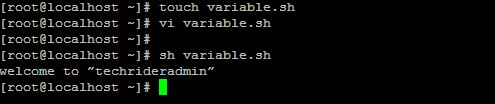
[root@localhost ~]# sh variable.sh

After execute the above command we can find the below output..

Output:
welcome to “techrideradmin”
How to define variable in  shell script on CentOS and RHEL 6/7  step by step guide
How to define variable in  shell script on CentOS and RHEL 6/7  step by step guide


That’s all. If this article is helpful please share it!!!!


Please Donate To Bitcoin Address: [[address]]
Donation of [[value]] BTC Received. Thank You.
[[error]]

How to create shell script on CentOS and RHEL 6/7 step by step guide

How to create shell script on CentOS and RHEL 6/7  step by step guide


In this article we will learn how to create shell script and execute it on CentOS and RHEL linux system.

Shell script is very powerful language for a system admin to execute the daily basic staff.

================================

How to create shell script on linux system

=====================================

Now we are going to write one small shell script program to understand how to write shell script on the linux system  .
First we create one empty file named test.sh using the below command.

#touch test.sh

After creating empty file we enter the below line in the file.

#!/bin/bash
echo Welcome to TechRiderAdmin

note: we shoule use #!/bin/bash to identify this script only run in bash shell not the other shell .

===========================

How to execute the shell script program

=======================================
To execute this program we need to give execute permission on the test.sh file execute the below command.

[root@localhost ~]#chmod u+x test.sh

After execute the above command we can run the script using the below command.

[root@localhost ~]#sh test.sh
How to create shell script on CentOS and RHEL 6/7  step by step guide
How to create shell script on CentOS and RHEL 6/7  step by step guide


That’s all. If this article is helpful please share it!!!!


Please Donate To Bitcoin Address: [[address]]
Donation of [[value]] BTC Received. Thank You.
[[error]]